Passkeys vs MFA vs SMS 2FA: Which Authentication Method Is Most Secure?
Authentication security has changed significantly.
For years, organizations were encouraged to move from password-only access to multifactor authentication. That advice remains correct, but the next question is now more important:
What kind of MFA are you using?
A one-time code sent by SMS, a TOTP authenticator app, a push notification, a FIDO2 security key, and a passkey are all very different security technologies.
They do not provide the same protection against phishing.
CISA states that not all MFA provides the same level of protection and recommends organizations move toward phishing-resistant authentication, particularly FIDO/WebAuthn.
Microsoft similarly recommends phishing-resistant methods such as:
- passkeys;
- FIDO2 security keys;
- Windows Hello for Business;
- Platform Credential for macOS;
- certificate-based authentication.
So the most useful comparison is not simply:
Passkeys vs MFA vs SMS 2FA
because passkeys can themselves be a form of MFA.
A more accurate question is:
How do passkeys compare with traditional phishable MFA methods such as SMS, TOTP codes, and push approvals?
The short answer is:
Passkeys and other FIDO-based methods provide substantially stronger phishing resistance than SMS or OTP-based authentication.
Quick Comparison
| Authentication method | Phishing resistant? | Passwordless? | Main weakness | Best use |
|---|---|---|---|---|
| Password only | No | No | Phishing/reuse | Avoid |
| SMS OTP | No | No | Phishing, SIM/telecom risk | Transitional fallback |
| Email OTP | No | No | Phishing, mailbox compromise | Low-risk fallback |
| TOTP authenticator | No | No | Real-time phishing relay | Transitional MFA |
| Push approval | No | No | Social engineering/MFA fatigue | Transitional |
| Number-matching push | Better, but not FIDO phishing resistance | No | Social engineering still possible | Interim |
| Synced passkey | Yes | Yes | Recovery/provider governance | Broad workforce |
| Device-bound passkey | Yes | Yes | Device lifecycle | Sensitive roles |
| FIDO2 security key | Yes | Yes | Hardware distribution/recovery | Admins/high-risk users |
| Windows Hello for Business | Yes | Yes | Managed-device dependency | Enterprise workforce |
The important distinction is origin-bound cryptographic authentication.
Passkeys and FIDO2 authenticators are designed to authenticate only to the legitimate relying party for which the credential was created. Microsoft calls this verifier impersonation resistance.
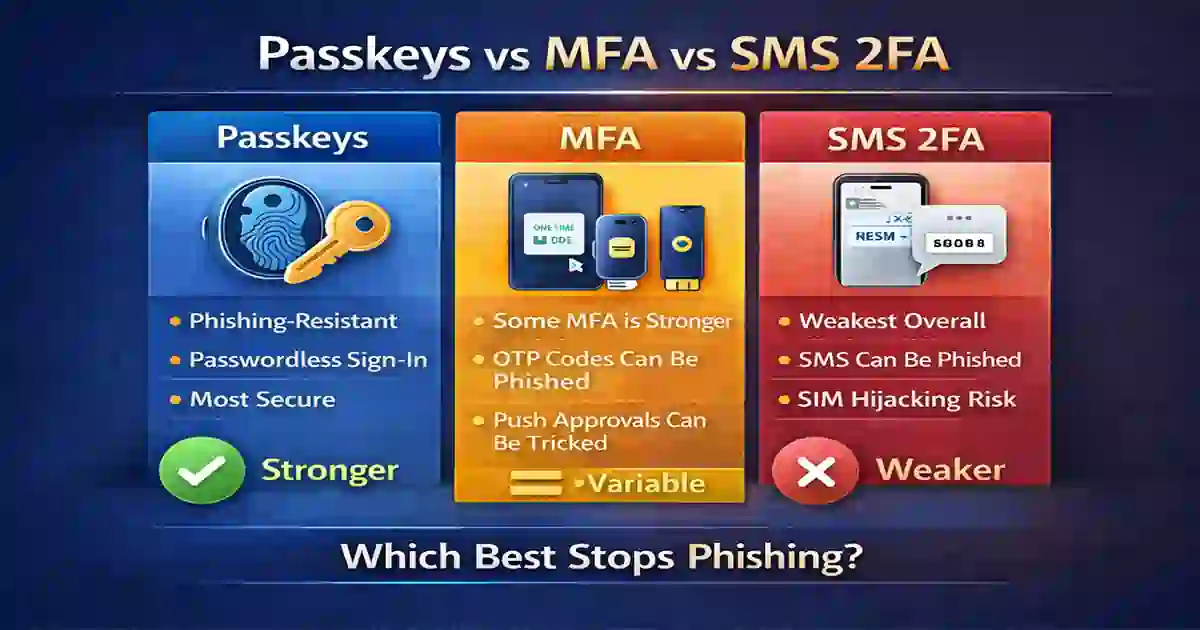
Table of Contents
What Are Passkeys?
Passkeys are FIDO2 credentials based on public-key cryptography.
Instead of storing a reusable password that both the user and the service effectively depend on, a passkey uses a cryptographic key pair:
Private key
stays protected by the authenticator.
Public key
is stored by the service and used to verify authentication.
The private key is not sent to the website during login.
A user typically unlocks the credential using:
- fingerprint;
- face recognition;
- device PIN;
- security-key PIN.
Microsoft describes passkeys as phishing-resistant credentials and says they can satisfy MFA requirements when combined with device biometrics or a PIN.
That is an important correction to the common idea that passkeys are somehow separate from MFA.
They can be:
passwordless + phishing-resistant + multifactor
in the same authentication flow.
For a deployment-oriented guide, see Phishing-Resistant MFA in 2026.
Why Passkeys Resist Phishing
The security advantage comes from the relationship between the passkey and the legitimate service.
Suppose an attacker creates:
micros0ft-login-example.com
and tries to imitate Microsoft.
A traditional phishing attack might convince a user to enter:
- username;
- password;
- SMS code;
- TOTP code.
But a properly implemented passkey is bound to the legitimate relying party.
The authenticator will not simply release the credential to a different phishing domain.
CISA explains this as a key reason FIDO/WebAuthn blocks fake-site credential capture.
This is fundamentally different from a one-time code, which the user can still type into the wrong website.
What Is MFA?
Multifactor authentication means requiring more than one category of authentication factor.
Common categories include:
Something you know
- password;
- PIN.
Something you have
- phone;
- hardware security key;
- device-bound credential.
Something you are
- fingerprint;
- face.
But MFA is a category, not one security strength.
That means all of the following may technically be described as MFA:
Password + SMS
Password + TOTP
Password + push approval
FIDO2 security key + PIN
Passkey + biometric
These methods do not provide equal resistance to modern phishing.
CISA explicitly warns organizations not to treat all MFA as equivalent.
What Is SMS 2FA?
SMS two-factor authentication sends a one-time code to the user’s telephone number.
It became popular because it is:
- easy to understand;
- inexpensive to deploy;
- compatible with almost any phone;
- better than password-only authentication.
That last point matters:
SMS 2FA is still better than having no second factor.
But it is not considered phishing-resistant.
A fake login site can ask the user for:
- password;
- SMS code.
The attacker can relay both to the legitimate service in real time.
SMS also introduces telecom-specific risks.
NIST currently treats phone- and SMS-based one-time passwords delivered over the public telephone network as restricted authenticators, reflecting concerns including number reassignment, SS7 weaknesses, forwarding, and other risks.
NIST’s current final authentication guidance is SP 800-63B-4, published in 2025 and superseding the earlier SP 800-63B.
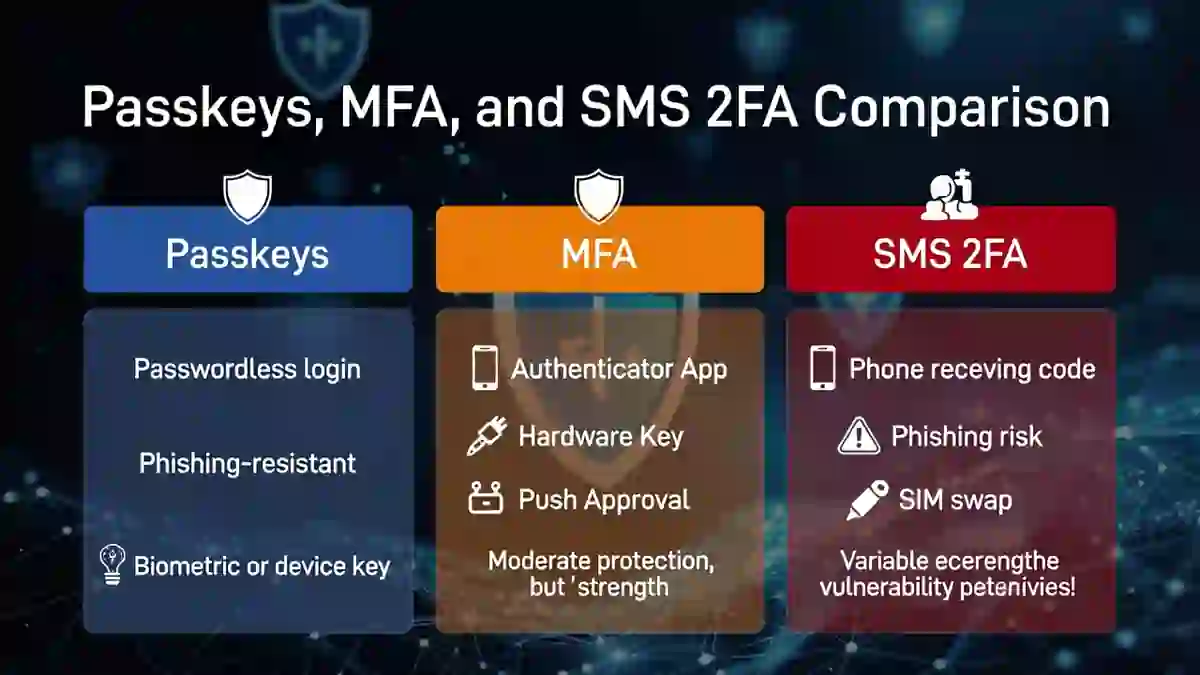
Passkeys vs Traditional MFA vs SMS 2FA
The clearest difference is the attacker’s ability to steal or relay authentication information.
SMS
The user receives a code and types it.
An attacker may be able to trick the user into entering that code into a phishing page.
TOTP authenticator app
The user reads a rotating code and types it.
This avoids SMS delivery risks but the code itself can still be captured and relayed by an adversary-in-the-middle phishing site.
Push MFA
The user approves a sign-in request.
Push can be stronger than SMS, especially with number matching and contextual information, but social engineering remains possible.
Passkey/FIDO2
The authenticator cryptographically verifies the legitimate service.
The user does not manually transfer a reusable secret or OTP to the site.
That is why passkeys provide materially stronger phishing resistance.
Cybersecurity Time Authentication Security Matrix
A useful comparison should consider more than whether a second factor exists.
| Method | Password theft resistance | Fake-site resistance | Telecom exposure | User experience | Strategic role |
|---|---|---|---|---|---|
| Password only | Low | Low | None | Familiar | Retire where possible |
| SMS 2FA | Medium | Low | High | Easy | Fallback |
| TOTP | Medium/High | Low | None | Moderate | Transitional |
| Push | Medium/High | Medium | None | Easy | Transitional |
| FIDO2 security key | Very high | Very high | None | Moderate | Privileged users |
| Synced passkey | Very high | Very high | None | Very good | General workforce |
| Device-bound passkey | Very high | Very high | None | Good | High assurance |
| WHfB | Very high | Very high | None | Very good | Managed enterprise |
This is a practical Cybersecurity Time assessment, not an official scoring framework.
7 Important Facts About Passkeys, MFA and SMS
1. Passkeys Are Phishing-Resistant by Design
Microsoft describes passkeys as phishing-resistant credentials with verifier impersonation resistance.
This means the authenticator verifies the correct relying party rather than depending on the user to visually determine whether a login page is genuine.
2. Not All MFA Is Phishing-Resistant
The phrase:
“We use MFA.”
does not tell you enough.
An organization may have:
100% MFA coverage
while almost every user still relies on SMS or phishable OTPs.
A better metric is:
percentage of users using phishing-resistant authentication.
CISA’s guidance explicitly distinguishes stronger FIDO/WebAuthn authentication from other MFA methods.
3. SMS Is Better Than Password-Only Access
SMS should not be described as worthless.
CISA states that any MFA is better than no MFA, even while encouraging movement toward stronger phishing-resistant methods.
For organizations that currently have:
password only
moving immediately to:
password + SMS
can still reduce risk.
The mistake is treating SMS as the final authentication architecture.
4. SMS Carries Telecom-Specific Risk
SMS depends on the telephone network.
Potential security considerations include:
- SIM-related attacks;
- telephone-number reassignment;
- message forwarding;
- telecommunications weaknesses;
- social engineering against mobile providers.
NIST therefore treats PSTN-delivered OTP as restricted rather than as the preferred modern authentication method.
5. OTP-Based MFA Can Still Be Phished
TOTP apps remove several SMS-specific risks because the code is generated locally rather than delivered through the telephone network.
However, the user can still type the code into an attacker-controlled website.
Modern adversary-in-the-middle phishing can attempt to relay authentication in real time.
This means:
TOTP is generally stronger than SMS
but:
TOTP is still not equivalent to FIDO phishing resistance.
6. Passkeys Can Improve Usability as Well as Security
Strong security controls often introduce additional user friction.
Passkeys can reduce some of that friction because users no longer need to:
- remember complex passwords;
- type rotating codes;
- wait for SMS messages;
- approve repeated push prompts.
Microsoft now supports both synced and device-bound passkeys and describes synced passkeys as a practical, lower-cost option for many ordinary users. For highly privileged or heavily regulated use cases, Microsoft recommends stronger controlled options such as FIDO2 security keys.
7. The Strategic Goal Should Be Phishing Resistance
The long-term goal should not merely be:
“Enable MFA.”
It should be:
“Make important authentication phishing-resistant.”
This is especially important for:
- administrators;
- identity teams;
- finance staff;
- help-desk personnel;
- executives;
- cloud engineers;
- remote administrators.
Your organization can use the Phishing-Resistant MFA Deployment Checklist for a staged rollout.
A Major Microsoft Entra Change in 2026
For Microsoft Entra customers, this comparison has become even more timely.
Microsoft says that beginning September 1, 2026, passkeys become the default authentication experience for users enabled for SMS or voice.
Microsoft also says its own SMS and voice MFA delivery will be retired on February 1, 2027. Organizations that still want telecom-based methods after that date will need to use supported customer-managed providers.
This signals a clear platform direction:
move users away from SMS/voice and toward phishing-resistant authentication.
Organizations using Microsoft Entra should therefore begin identifying users who still rely on:
- SMS;
- voice;
- older MFA methods.
Then migrate them toward:
- passkeys;
- Windows Hello for Business;
- FIDO2 security keys;
- other supported phishing-resistant methods.
For tenant-level controls, see Microsoft 365 and Entra Hardening Checklist.
Synced Passkeys vs Device-Bound Passkeys
Not every passkey implementation has the same operational characteristics.
Microsoft currently distinguishes between synced and device-bound passkeys.
Synced Passkeys
Synced passkeys may be securely synchronized through supported credential providers.
Advantages
- easy device migration;
- lower support costs;
- strong usability;
- good fit for general workforce deployment.
Considerations
- recovery model;
- credential-provider trust;
- lack of device provenance/attestation in some environments.
Microsoft says synced passkeys are still phishing-resistant even though they do not provide device provenance.
Device-Bound Passkeys
Device-bound credentials remain associated with a specific authenticator.
Advantages
- stronger device assurance;
- attestation possibilities;
- useful for privileged or regulated roles.
Tradeoffs
- replacement logistics;
- hardware lifecycle;
- higher support burden.
A good organization does not necessarily choose one for everyone.
It chooses authentication strength according to risk.
Which Method Stops Phishing Best?
For the specific question:
“Which authentication method best resists credential phishing?”
a useful practical ranking is:
- FIDO/passkeys and equivalent phishing-resistant authentication
- Stronger non-FIDO MFA with contextual protections
- TOTP authentication
- SMS OTP
- Password only
However, the exact ranking of non-FIDO methods can depend on the implementation.
The key distinction is that passkeys/FIDO2 are cryptographically bound to the legitimate service, while OTP-style methods still depend on information the user can potentially relay to an attacker.
What Should Businesses Deploy?
The answer depends on the user population.
Privileged Administrators
Prefer:
- FIDO2 security keys;
- device-bound passkeys;
- Windows Hello for Business;
- another approved phishing-resistant method.
Avoid routine fallback to SMS.
General Workforce
Synced passkeys can offer a strong balance of:
- phishing resistance;
- usability;
- low support friction.
Microsoft explicitly describes them as a convenient option for most users outside highly regulated or elevated-privilege scenarios.
Contractors
Use:
- phishing-resistant authentication where possible;
- device restrictions;
- least privilege;
- time-bound access.
Authentication strength should be combined with access governance.
Legacy Applications
If an application cannot support modern authentication, organizations should:
- document the exception;
- reduce accessible privileges;
- restrict source networks;
- monitor usage;
- plan migration.
Do not allow one legacy application to determine the security level of the entire identity platform.
What Should Individuals Use?
For personal accounts, the same basic hierarchy applies.
If the service supports passkeys:
use a passkey.
If it does not:
use a strong authenticator-app method rather than SMS where practical.
If SMS is the only available second factor:
use SMS rather than password-only access.
The goal is incremental improvement, not leaving an account unprotected because the strongest option is unavailable.
What About Authentication Apps?
Authenticator applications can mean several different things.
They may provide:
- TOTP codes;
- push approvals;
- number matching;
- passkeys.
These are not equivalent.
An app generating a six-digit code is still using an OTP model.
An app storing a FIDO passkey is using cryptographic phishing-resistant authentication.
So when someone says:
“We use an authenticator app.”
ask:
“Which authentication method inside the app?”
That is the technically meaningful question.
Passkeys vs Password Managers
Passkeys and password managers are related but different.
A password manager stores and fills passwords.
A passkey replaces the password-based authentication mechanism entirely where supported.
Some password managers can also act as passkey providers.
This means the same application may manage:
- passwords for older services;
- passkeys for newer services.
The important difference is the credential type being used during authentication.
Passkeys and Session Theft
Passkeys significantly improve login security, but they do not eliminate every identity threat.
Suppose a user signs in safely with a passkey.
If their endpoint later becomes infected with information-stealing malware, an attacker may attempt to steal the already authenticated session.
That is a different problem.
The attacker is no longer attacking the login ceremony.
They are attacking the session after successful authentication.
For that reason, strong identity security should combine:
- passkeys;
- endpoint security;
- session controls;
- device trust;
- session revocation;
- anomaly monitoring.
See Info Stealer Malware in 2026 for a deeper explanation of browser-cookie and session-token theft.
Recommended Authentication Roadmap
A practical migration can happen in phases.
Phase 1 — Inventory
Identify:
- authentication methods currently enabled;
- SMS users;
- TOTP users;
- privileged accounts;
- legacy applications;
- users already enrolled in passkeys.
Phase 2 — Protect Administrators
Move administrators and high-risk roles to phishing-resistant authentication first.
Phase 3 — Pilot Passkeys
Test:
- Windows;
- macOS;
- mobile;
- multiple devices;
- account recovery.
Phase 4 — Expand Workforce Enrollment
Enable passkeys for broader user groups.
Provide clear instructions.
Phase 5 — Reduce Weak Fallback
Gradually minimize:
- SMS;
- voice;
- old push methods;
- unnecessary exceptions.
Phase 6 — Measure Usage
Track:
- passkey enrollment;
- phishing-resistant sign-ins;
- SMS usage;
- fallback events;
- recovery events;
- legacy authentication.
Authentication Metrics That Matter
Instead of only reporting:
“MFA enabled: 98%”
consider reporting:
| Metric | Why it matters |
|---|---|
| % users with phishing-resistant MFA | Measures real security maturity |
| % privileged users using passkeys/FIDO2 | Measures critical-account protection |
| SMS authentications per month | Shows legacy reliance |
| TOTP authentications per month | Shows phishable-factor dependence |
| Authentication downgrade events | Reveals policy weakness |
| Account recovery events | Identifies bypass opportunities |
| Legacy authentication attempts | Shows old access paths |
| Passkey enrollment failures | Shows rollout friction |
This provides leadership with a much more meaningful picture than simple MFA enrollment.
Frequently Asked Questions
Are passkeys better than MFA?
Passkeys are not necessarily “instead of MFA.”
A passkey can itself satisfy multifactor requirements when it is unlocked with a device PIN or biometric. Microsoft explicitly describes passkeys this way.
The better comparison is:
passkeys vs traditional phishable MFA.
Against credential phishing, passkeys are generally stronger.
Is SMS 2FA still worth using?
Yes, when the alternative is password-only authentication.
CISA says any MFA is better than no MFA, although organizations should work toward phishing-resistant methods.
Is SMS 2FA phishing-resistant?
No.
A user can still be tricked into entering an SMS code into a fraudulent website.
The telephone delivery channel also introduces additional risks.
Is TOTP better than SMS?
Generally, yes.
TOTP avoids telecom-specific threats such as SIM-related attacks, but the code can still be phished and relayed.
Are passkeys completely secure?
No authentication system eliminates every risk.
Passkeys greatly reduce traditional credential-phishing risk, but organizations still need to protect:
- endpoints;
- sessions;
- account recovery;
- device enrollment;
- privileged access.
Can a passkey be synced between devices?
Yes, depending on the implementation.
Microsoft Entra supports synced passkeys and device-bound passkeys. Both are phishing-resistant, though their assurance and lifecycle characteristics differ.
Should administrators use synced passkeys?
Possibly, depending on organizational risk requirements.
Microsoft recommends FIDO2 security keys for elevated-privilege users and highly regulated environments, while synced passkeys may be suitable for broader workforce use.
Is Microsoft removing SMS MFA?
Microsoft says Microsoft-provided SMS and voice MFA delivery in Entra ID will be retired on February 1, 2027. Passkey migration begins earlier, with passkeys becoming the default experience for eligible SMS/voice users from September 1, 2026.
Final Verdict
The best answer is not:
“Passkeys beat MFA.”
That comparison is technically imprecise because passkeys can themselves provide multifactor authentication.
The more accurate conclusion is:
Passkeys and other FIDO-based authentication methods provide stronger phishing resistance than traditional SMS, OTP, and approval-based MFA methods.
For most organizations, the practical direction is:
privileged users → strong phishing-resistant authentication
general workforce → passkeys where supported
legacy systems → stronger non-SMS MFA while migration continues
SMS → fallback rather than strategic end state
And because Microsoft is actively moving Entra users toward passkeys and retiring Microsoft-provided SMS/voice authentication in 2027, this is no longer merely a theoretical best practice.
For a detailed implementation plan, continue with the Phishing-Resistant MFA Deployment Checklist.
Primary Sources
Use this compact source box at the bottom of the article:
- CISA — More Than a Password
- CISA — Implementing Phishing-Resistant MFA
- Microsoft Entra — Passkeys (FIDO2)
- Microsoft Entra — Authentication Overview
- Microsoft Entra — Passkeys by Default and SMS/Voice Retirement
- NIST SP 800-63B-4 — Authentication and Authenticator Management
- NIST SP 800-63-4 — Digital Identity Guidelines
NIST’s current final digital-identity guidance supersedes the old SP 800-63-3 family, so I strongly recommend replacing the old NIST link currently present in your article.