Info Stealer Malware in 2026: How Credential and Session Theft Leads to Ransomware
Info stealer malware has evolved from a relatively simple password-theft problem into a broader identity and access threat.
Modern infostealers can collect far more than usernames and passwords. Depending on the malware family and infected system, attackers may obtain:
- browser cookies;
- authentication tokens;
- saved passwords;
- autofill data;
- VPN configuration files;
- email credentials;
- cryptocurrency wallets;
- local documents;
- system information;
- developer secrets.
That matters because a stolen password is only one way to obtain access.
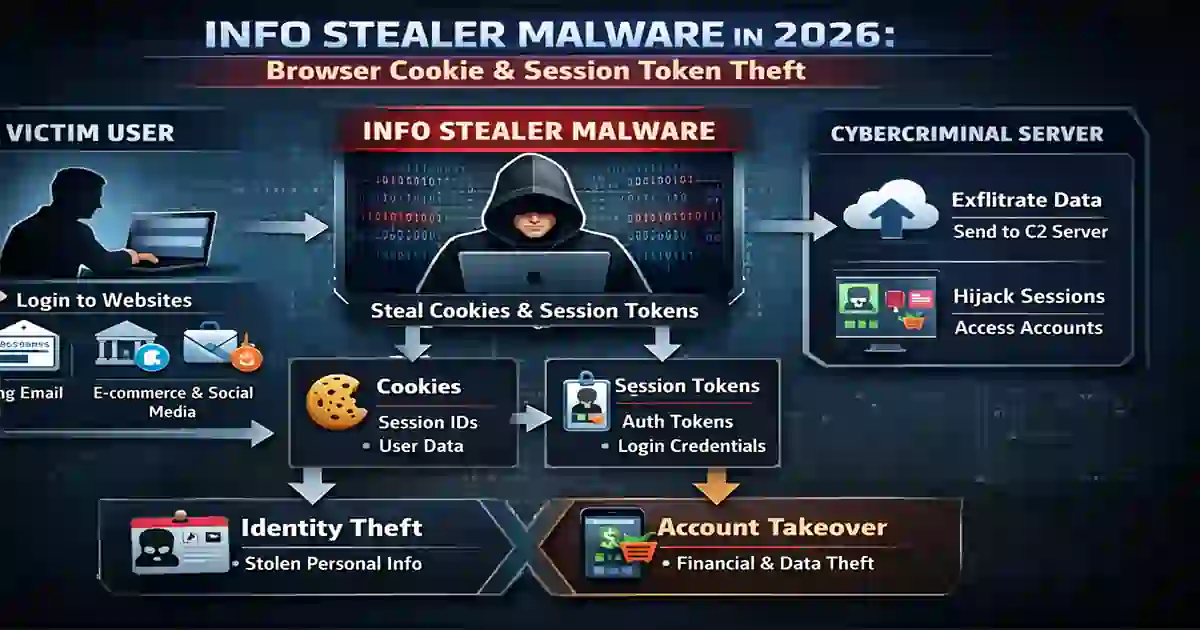
A stolen browser session or authentication token may allow an attacker to reuse an already authenticated session, potentially reducing the friction normally created by password checks or multifactor authentication.
Google’s Chrome security team describes session theft as a persistent security problem and notes that infostealers such as LummaC2 can extract existing browser cookies and send them to attacker-controlled infrastructure. Those cookies may then be traded or sold for unauthorized account access.
Microsoft’s 2026 infostealer research also shows that the threat is increasingly cross-platform. Recent campaigns have targeted Windows, macOS, and Python-supported environments while abusing legitimate platforms, fake installers, phishing, and social-engineering techniques.
The important lesson for defenders is simple:
An infostealer infection should be treated as a possible identity compromise, not merely as a malware-cleanup event.
Executive Summary
The highest-risk consequences of an infostealer infection include:
| Stolen asset | Potential consequence | Response priority |
|---|---|---|
| Password | Account takeover | High |
| Browser cookie | Reuse of authenticated session | Critical |
| Authentication token | Cloud or SaaS access | Critical |
| VPN credentials/config | Remote network access | Critical |
| Email credentials | Business email compromise | Critical |
| Developer secrets/API keys | Cloud/application compromise | Critical |
| Crypto wallet data | Direct financial theft | Critical |
| Local documents | Data exposure and reconnaissance | High |
| System metadata | Victim profiling and targeting | Medium/High |
The response should therefore go beyond deleting the malicious executable.
Security teams should consider:
endpoint isolation + session revocation + credential reset + cloud-log review + privileged-account investigation + secret rotation + lateral-movement hunting.
Table of Contents

What Is Info Stealer Malware?
An information stealer, or infostealer, is malware designed to collect valuable information from an infected device and transmit it to an attacker.
The information stolen depends on the malware family, but common targets include:
- browser passwords;
- session cookies;
- saved form data;
- browser autofill;
- cryptocurrency wallets;
- email clients;
- VPN profiles;
- documents;
- application credentials;
- system information.
Microsoft’s analysis of Lumma Stealer shows that the malware targets saved passwords, session cookies, autofill information, cryptocurrency wallets, VPN files, email applications, user documents, and system metadata.
This collection is valuable because it gives attackers both access and context.
A stolen password says:
This account exists.
A stolen browser session may say:
This user is already authenticated.
A collection of VPN files, browser data, documents, and system metadata may reveal:
This user has access to valuable corporate infrastructure.
That can dramatically change the value of an infected endpoint.
Why Session Cookies and Authentication Tokens Matter
Password theft is serious, but passwords increasingly encounter additional defenses such as:
- MFA;
- conditional access;
- device verification;
- risk-based authentication;
- location checks.
Session theft attacks a different part of the authentication lifecycle.
After a legitimate user logs in, the application commonly issues a cookie or token that represents an authenticated session.
If malware can steal that token and the service permits it to be replayed, an attacker may be able to impersonate the user without going through the entire login process again.
Google describes this exact problem in its work on Device Bound Session Credentials. According to Google, infostealer malware can harvest browser session cookies, and attackers can reuse those cookies to gain unauthorized access without needing the victim’s password.
This does not mean MFA is useless.
MFA still blocks many credential-based attacks and remains an essential security control. But defenders also need to protect the authenticated session that exists after MFA succeeds.
For identity-hardening guidance, see Phishing-Resistant MFA Checklist.
How Infostealers Reach Victims
Modern infostealer distribution is highly varied.
Microsoft has documented Lumma Stealer campaigns using:
- phishing emails;
- malvertising;
- poisoned search results;
- compromised websites;
- fake CAPTCHA pages;
- ClickFix techniques;
- trojanized software;
- pirated applications;
- legitimate cloud services;
- malware loaders.
This means organizations cannot rely on one simple prevention rule such as:
“Do not open suspicious email attachments.”
A user may instead encounter a convincing fake software-download page while searching the web.
Malvertising and Search Poisoning
Attackers can buy or manipulate advertisements that appear when users search for popular software.
Microsoft documented Lumma campaigns where malicious advertisements targeted searches such as software downloads and browser updates. The attacker then redirected users to cloned or fraudulent websites that delivered malware.
The victim may believe they are downloading:
- a browser;
- VPN client;
- utility;
- media software;
- remote-access tool.
Instead, they install an infostealer.
Fake CAPTCHA and ClickFix Attacks
ClickFix attacks are particularly effective because they persuade users to execute the malware themselves.
A fraudulent website might claim:
Complete this verification.
The user is then instructed to copy and run a command.
Microsoft observed Lumma Stealer campaigns using fake CAPTCHA pages where victims were instructed to paste malicious commands into Windows Run.
This approach turns the user into the execution mechanism.
Trojanized Software
Cracked or pirated applications also remain a useful distribution channel.
Microsoft observed Lumma binaries bundled inside trojanized versions of legitimate applications and distributed through file-sharing platforms.
Organizations should therefore restrict unauthorized software installation and provide trusted internal software-distribution channels.
Why Infostealers Matter to Ransomware Defense
An infostealer infection does not automatically mean ransomware will follow.
However, stolen access can create exactly the type of foothold ransomware operators value.
The progression may look like:
malicious download
↓
infostealer execution
↓
credentials/cookies/tokens stolen
↓
access sold or reused
↓
VPN/cloud account compromise
↓
privilege escalation
↓
internal reconnaissance
↓
data theft
↓
ransomware/extortion
Microsoft says Lumma operates as Malware-as-a-Service and has been used in campaigns by ransomware-related threat actors.
For the broader intrusion path, see Ransomware Initial Access in 2026.
7 Major Infostealer Risks in 2026
1. Session Hijacking Can Bypass the Normal Login Flow
The first major risk is the theft of valid browser sessions.
If an attacker obtains a reusable authentication token, the activity may look different from a conventional password attack.
Instead of:
wrong password → repeated failures → alert
the attacker may attempt:
valid session → successful access
That can make malicious access harder to distinguish from legitimate behavior.
Defensive priorities
- revoke sessions after suspected stealer infection;
- monitor new devices;
- detect unusual source networks;
- use conditional access;
- shorten sensitive session lifetimes;
- require reauthentication for high-risk actions.
2. Personal Devices Can Become Enterprise Entry Points
Infostealers do not care whether the infected device belongs to the business.
The compromised machine may be:
- an employee’s personal laptop;
- a contractor device;
- a home computer;
- an unmanaged development workstation.
If that device contains active sessions for corporate services, the organization may still be exposed.
This is particularly important when users synchronize browsers across personal and business environments.
Questions defenders should ask
- Are corporate credentials stored in personal browsers?
- Can unmanaged devices authenticate to sensitive SaaS services?
- Are administrator sessions allowed from unmanaged endpoints?
- Does conditional access enforce device health?
3. Stolen Logs Feed the Initial-Access Economy
Attackers who operate infostealers do not always use the stolen credentials themselves.
Infostealer data can be:
- sold;
- traded;
- bundled;
- transferred to access brokers;
- used by another criminal group.
Microsoft describes Lumma as a Malware-as-a-Service operation where affiliates can generate malware builds and manage stolen information through dedicated infrastructure.
That specialization makes the criminal ecosystem more scalable.
One group steals the access.
Another group buys it.
A third group may use it for extortion or ransomware.
4. Infostealers Shorten the Time From Infection to Business Impact
An attacker with only an email address still has work to do.
An attacker with:
- an authenticated cloud session;
- VPN information;
- saved credentials;
- internal documents;
- browser history;
- system details
starts much closer to meaningful access.
That reduces the time defenders may have to contain the incident.
This is why detection and containment speed matter.
See Mean Time to Detect for guidance on shortening the gap between compromise and discovery.
5. Infostealers Are Increasingly Cross-Platform
Infostealer defense can no longer focus exclusively on Windows.
Microsoft reported in February 2026 that campaigns increasingly target:
- macOS;
- Python-enabled environments;
- browsers;
- Apple Keychain data;
- developer environments;
- financial accounts;
- cryptocurrency wallets.
Examples observed by Microsoft include DigitStealer, MacSync, Atomic macOS Stealer, and Python-based families such as PXA Stealer.
Why this matters
Organizations with mixed Windows/macOS environments may have inconsistent:
- endpoint protection;
- logging;
- application control;
- browser policies;
- incident-response coverage.
Attackers can exploit whichever platform receives less defensive attention.
6. Malware-as-a-Service Makes Infostealers Easier to Operate
Modern cybercrime increasingly uses service-based business models.
Lumma Stealer is a clear example.
Microsoft describes Lumma as a Malware-as-a-Service operation where affiliates can purchase access to capabilities for:
- malware generation;
- command-and-control;
- campaign management;
- stolen-information collection.
The result is an ecosystem where attackers do not need to develop their own sophisticated malware.
They can rent it.
This lowers the technical barrier to entry and increases campaign volume.
7. Infostealers Blur the Boundary Between Theft, Extortion and Ransomware
The traditional view of ransomware was straightforward:
malware encrypts files → attacker demands payment.
Modern extortion campaigns can be much more complex.
Stolen access may first be used for:
- reconnaissance;
- data collection;
- cloud compromise;
- privilege escalation.
Attackers may then steal sensitive information and threaten to publish it.
Encryption may happen later—or not at all.
This means an infostealer infection can become part of:
credential theft → account takeover → data theft → extortion → ransomware
rather than a standalone endpoint event.
Cybersecurity Time Infostealer Exposure Matrix
The most useful response priority depends on what was stolen, not simply which malware family was detected.
| Exposed information | Main concern | Priority |
|---|---|---|
| Basic password | Account takeover | High |
| Admin password | Privileged compromise | Critical |
| Session cookie | Session hijacking | Critical |
| OAuth/session token | Cloud account compromise | Critical |
| VPN credentials/profile | Remote network access | Critical |
| API key | Application/cloud access | Critical |
| Developer token | Supply-chain or cloud exposure | Critical |
| Email session | BEC/data exposure | Critical |
| Cryptocurrency wallet | Financial theft | Critical |
| Local documents | Sensitive-data exposure | High |
| System metadata | Victim profiling | Medium |
Practical assessment
An alert reading “Infostealer detected” is not enough.
The responder should immediately ask:
What identities and secrets were accessible from this device?
That answer determines the real incident severity.
What Defenders Should Do After an Infostealer Infection
Simply quarantining the malware may leave the attacker with valid stolen access.
A stronger incident response should include the following.
1. Isolate the Endpoint
Remove the infected device from normal network access.
Preserve evidence according to your organization’s incident-response procedures.
Avoid immediately wiping a system if doing so would destroy evidence needed for investigation.
2. Revoke Active Sessions
This is one of the most important steps.
A password reset may not automatically invalidate every existing session in every service.
Review and revoke:
- cloud sessions;
- web sessions;
- VPN sessions;
- email sessions;
- privileged administrative sessions.
3. Reset Exposed Credentials
Prioritize accounts according to privilege and exposure.
Start with:
- administrator accounts;
- cloud administrators;
- finance users;
- email accounts;
- VPN accounts;
- developers;
- backup administrators.
4. Rotate API Keys and Secrets
Infostealers may access more than human credentials.
Check for exposed:
- API keys;
- cloud credentials;
- SSH keys;
- application secrets;
- developer tokens;
- browser-stored secrets.
Rotate any secret that may have been accessible.
5. Review MFA Changes
Attackers with account access may attempt to create persistence by registering:
- new MFA methods;
- new authentication devices;
- recovery addresses;
- passkeys;
- app passwords.
Review identity-provider configuration for suspicious changes.
6. Review Cloud Sign-In Activity
Look for:
- unfamiliar locations;
- unusual autonomous systems/IP ranges;
- unknown devices;
- impossible travel;
- sign-ins at unusual times;
- abnormal token use;
- privilege changes.
Do not assume that a successful login is legitimate simply because the password was correct.
7. Check VPN and Remote-Access Logs
If VPN information was accessible from the compromised device, examine:
- new source IPs;
- unusual countries;
- unknown devices;
- concurrent sessions;
- unexpected login times.
The goal is to determine whether stolen access has already been reused.
8. Review Browser Synchronization
Browser synchronization can extend exposure across devices.
Determine whether the compromised browser synchronized:
- passwords;
- history;
- extensions;
- bookmarks;
- account state
to other endpoints or user profiles.
9. Hunt for Lateral Movement
If business credentials were compromised, inspect for:
- RDP;
- SMB;
- SSH;
- remote-management activity;
- suspicious administrative tools;
- unexpected authentication to servers;
- new privileged accounts.
10. Determine Whether Notification or Escalation Is Required
If sensitive data or regulated accounts were exposed, incident-response and legal teams should determine whether notification, reporting, or regulatory obligations apply.
Use your Data Breach Timeline Template to document key events and decisions.
The First 60 Minutes After an Infostealer Alert
A practical high-priority sequence is:
Minutes 0–10
- isolate the endpoint;
- open an incident;
- identify the user;
- identify privileged access available from the device.
Minutes 10–20
- revoke cloud sessions;
- disable high-risk accounts if necessary;
- begin password resets;
- preserve logs.
Minutes 20–30
- identify VPN, email, SaaS, and browser sessions;
- rotate critical secrets;
- inspect MFA registrations.
Minutes 30–45
- review authentication logs;
- search for suspicious remote access;
- check for unusual administrator activity.
Minutes 45–60
- start lateral-movement hunting;
- determine data exposure;
- identify connected third-party accounts;
- establish next containment steps.
This sequence is a general defensive framework and should be adapted to the organization’s own incident-response process.
How to Reduce Infostealer Risk
Use phishing-resistant authentication
FIDO2 security keys and passkeys can significantly strengthen resistance against conventional credential phishing.
However, session protection remains important because authentication security does not end when the login succeeds.
See Phishing-Resistant MFA Checklist.
Restrict software installation
Prevent users from casually installing:
- cracked software;
- unauthorized utilities;
- unapproved browser extensions;
- unknown VPN clients.
Use trusted software distribution wherever possible.
Strengthen browser security
Browsers hold valuable authentication information.
Security teams should consider:
- managed browser policies;
- extension control;
- safe browsing protections;
- device trust;
- session monitoring;
- browser update enforcement.
Google’s development of Device Bound Session Credentials is specifically intended to reduce the usefulness of stolen cookies by cryptographically binding sessions to devices.
Use endpoint detection and response
Microsoft recommends controls including attack-surface-reduction rules designed to limit script abuse, executable execution, credential theft, and malicious process behavior associated with campaigns such as Lumma.
Block ClickFix-style behavior
Train users never to copy commands from webpages claiming they are required to:
- complete a CAPTCHA;
- fix a browser;
- install an update;
- resolve an error.
Security monitoring should also flag unusual use of scripting interpreters and command-launching utilities.
Monitor infostealer exposure as an identity problem
SOC teams should connect endpoint detections to identity investigations.
An infostealer alert should automatically trigger questions about:
- affected accounts;
- active sessions;
- cloud access;
- administrative privileges;
- secrets stored on the endpoint.
Frequently Asked Questions
What does info stealer malware steal?
Common targets include passwords, browser cookies, authentication tokens, autofill information, cryptocurrency wallets, VPN files, user documents, and system information.
Microsoft’s Lumma analysis confirms many of these capabilities.
Can an infostealer bypass MFA?
Not necessarily by defeating MFA directly.
However, stolen authenticated sessions or tokens may allow an attacker to reuse an existing session after the user already completed authentication.
That is one reason session security is important in addition to strong MFA.
Are infostealers only a Windows threat?
No.
Microsoft’s 2026 research documents expanding macOS campaigns and Python-based infostealers as well as traditional Windows threats.
Can infostealers lead to ransomware?
Yes, stolen access can be useful to ransomware operators or initial-access brokers.
Microsoft reports that ransomware-linked threat actors have used Lumma Stealer in campaigns.
An infostealer infection does not guarantee a ransomware incident, but it can create the access that enables one.
Is changing the password enough?
Not always.
Organizations may also need to:
- revoke active sessions;
- rotate tokens and API keys;
- review MFA registrations;
- inspect cloud and VPN activity;
- investigate the endpoint for additional compromise.
What is Malware-as-a-Service?
Malware-as-a-Service allows criminals to provide malware tooling and infrastructure to affiliates or customers.
Microsoft describes Lumma as a MaaS ecosystem in which affiliates can create builds and manage stolen information through dedicated infrastructure.
Final Takeaway
Info stealer malware should no longer be classified as minor commodity malware.
The real risk is not simply:
“A password was stolen.”
The more important question is:
“What trusted access was available from the infected device?”
Modern infostealers can collect browser sessions, credentials, VPN information, financial data, developer secrets, documents, and system details. Attackers may then reuse that information themselves or sell it to other criminal groups.
The most effective response therefore combines:
endpoint containment + session revocation + identity investigation + credential rotation + secret rotation + cloud-log review + lateral-movement hunting.
A successful malware cleanup removes the program.
A successful incident response removes the attacker’s access.
Primary Sources
Use a concise source section like this at the bottom of the article:
- Microsoft — Infostealers Without Borders: macOS, Python Stealers and Platform Abuse
- Microsoft — Lumma Stealer: Delivery Techniques and Capabilities
- Google Security Blog — Protecting Cookies with Device Bound Session Credentials