
Free online cybersecurity tool
DNS Lookup Tool
Check DNS records, propagation, email DNS security, and domain health in seconds. No login required.
How to use this DNS Lookup Tool
- Enter your domain name, hostname, or IP address.
- Choose Smart DNS Health Report for a simple readable diagnosis, or choose a specific DNS record.
- Review the result, warnings, TTL values, email DNS records, and propagation status.
- Use Copy result or Download JSON if you need to share the report with a developer, hosting company, or email provider.
What the result means
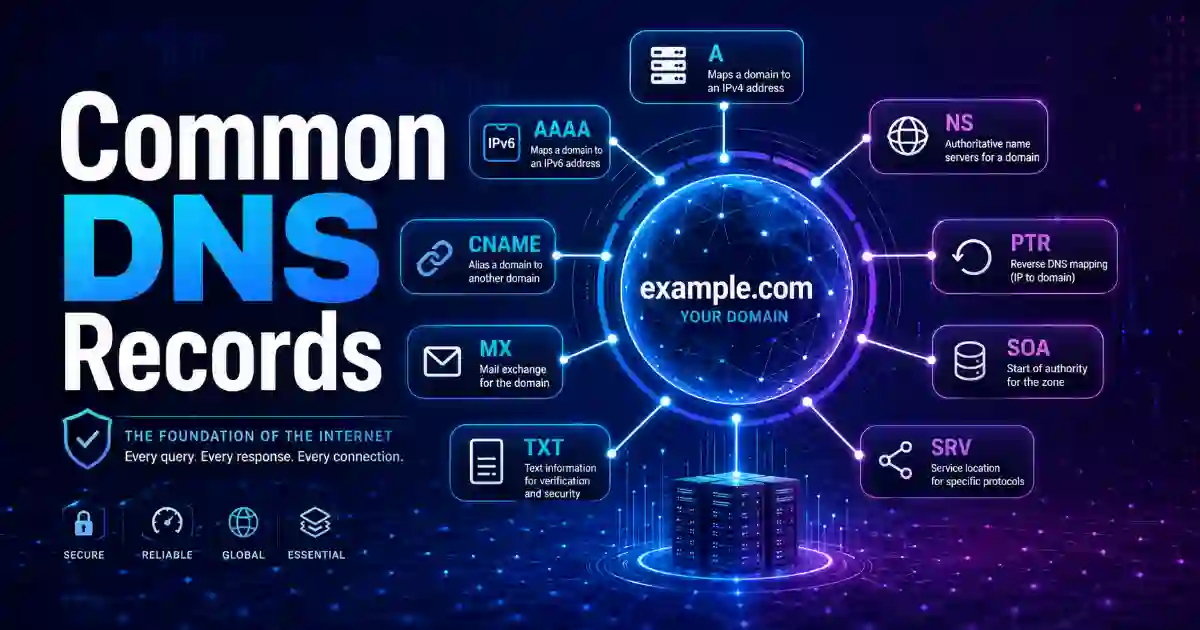
DNS records tell browsers, email servers, and security tools where your domain should point. A records point to IPv4 addresses, AAAA records point to IPv6 addresses, MX records handle email delivery, TXT records often hold SPF and verification records, NS records show authoritative nameservers, CAA records control which certificate authorities may issue SSL certificates, and DMARC helps protect your domain from email spoofing.
FAQ
What is a DNS lookup?
A DNS lookup checks the public DNS records of a domain so you can see where the website, email, and verification records are configured.
Why are my DNS changes not visible everywhere?
DNS changes can take time because resolvers cache old records until the TTL expires. The propagation check compares results from major public resolvers to help identify inconsistency.
Can this tool check SPF and DMARC?
Yes. Choose Email DNS Audit to check MX records, SPF TXT records, and the DMARC record at _dmarc.yourdomain.com.
Do you store searched domains?
No. This plugin does not store submitted domains or DNS results. It only uses a temporary rate-limit counter to help prevent abuse.
Privacy note: We do not store your input.
DNS Lookup Tool
Use this DNS Lookup Tool to check your domain’s DNS records, website connection, email setup, DNS propagation, and security records in one simple place. The tool is fast, mobile-friendly, and does not require access.
If your website is not opening, your email is not working, your DNS change is not showing, or your SSL certificate has an issue, this tool can help you understand what is happening.

How to Use the DNS Lookup Tool
How to Use the DNS Lookup Tool
Use this DNS Lookup Tool to check your domain’s DNS records quickly and understand whether your website, email, hosting, or domain verification records are configured correctly.
Enter your domain name, choose the DNS record type you want to check, and click the lookup button. You can check common records such as A, AAAA, MX, TXT, NS, CNAME, CAA, SPF, DMARC, PTR, SOA, and SRV.
After the result appears, review the record value, status, and explanation. You can use the Copy Result button to share the DNS report with your developer, hosting provider, domain registrar, CDN provider, or email service.
No access is required, and we do not store your input.
What is a DNS Lookup Tool?
A DNS Lookup Tool checks the public DNS records of a domain name. DNS stands for Domain Name System. It helps the internet know where your website, email, and domain services should point.
For example, DNS helps answer:
Where is this website hosted?
Which mail server receives email for this domain?
Which nameservers control the domain?
Has the TXT verification record been added?
Are SPF, DKIM, and DMARC records available?
Is a CAA record set for SSL certificate control?
DNS is important because one wrong record can stop a website from loading, break business email, delay domain verification, or cause SSL problems.
Why Use This DNS Lookup Tool?
Most people use a DNS tool when something important is not working. Maybe the website is down. Maybe email is bouncing. Maybe a new hosting setup is not connected yet. Maybe a domain verification record is not accepted. Maybe an SSL certificate cannot be issued.
This DNS Lookup Tool helps you check the issue quickly.
You can use it to:
Check if your domain points to the correct server.
Confirm whether DNS changes are visible publicly.
Check nameservers after a domain change.
Find missing or incorrect MX records.
Review SPF, DKIM, and DMARC email records.
Check TXT records for domain verification.
Review CAA records for SSL certificate settings.
Understand why your website or email may not be working.
The goal is simple: help users solve real DNS problems without confusion.
How to Use This DNS Lookup Tool
Using this tool is simple.
Enter your domain name, such as example.com. Select the DNS record type you want to check. Click the lookup button and wait for the result.
After the result appears, compare it with the value provided by your hosting company, DNS provider, domain registrar, CDN, or email service.
Examples:
Use example.com to check your main domain.
Use www.example.com to check the www version of your website.
Use mail.example.com to check a mail-related hostname.
Use your DKIM selector if your email provider gives you one.
For best results, enter only the domain or hostname. Do not enter passwords, secret keys, account tokens, or private admin URLs.
What Your DNS Result Means
A good DNS tool should not only show technical output. It should also explain what the result means.
If an A record is found, your domain has an IPv4 destination. This usually helps your website point to a server.
If an AAAA record is found, your domain has an IPv6 destination. This is used by modern networks and hosting providers.
If a CNAME record is found, your hostname points to another hostname. This is common for subdomains like www, blog, shop, or app.
If MX records are found, your domain has mail servers for receiving email.
If TXT records are found, your domain may include verification records or email security records like SPF, DKIM, and DMARC.
If NS records point to an unexpected company, your DNS may be managed by a different provider.
If a CAA record is found, your SSL certificate authority permissions may be controlled.
If DMARC is missing, your email domain may have weaker protection against spoofing.
Always compare the result with the exact value given by your hosting provider, email service, CDN, DNS provider, or domain registrar.
DNS Records You Can Check
A Record
An A record points your domain to an IPv4 address. This is one of the most important records for website hosting.
If your website is not opening after moving to a new server, check the A record first.
AAAA Record
An AAAA record points your domain to an IPv6 address. Some hosting providers use IPv6 along with IPv4.
If your website works on some networks but not others, checking the AAAA record may help.
CNAME Record
A CNAME record points one hostname to another hostname. It is commonly used for subdomains such as www, blog, shop, and app.
If your www version is not working, the CNAME record may be missing or incorrect.
MX Record
MX records show which mail servers receive email for your domain.
If your business email is not receiving messages, check your MX records first.
TXT Record
TXT records store text information. They are commonly used for domain verification, SPF, DKIM, DMARC, and other security settings.
If a platform says your domain verification failed, your TXT record may be missing, incorrect, or added in the wrong DNS dashboard.
NS Record
NS records show which nameservers control your domain’s DNS.
This is very important. If your nameservers point to the wrong provider, DNS changes made somewhere else may not work.
SOA Record
An SOA record contains technical information about a DNS zone. It is mainly useful for DNS administrators and advanced troubleshooting.
CAA Record
A CAA record tells which certificate authorities are allowed to issue SSL certificates for your domain.
If your SSL certificate has a problem, checking the CAA record can help.
SRV Record
An SRV record is used by some services to define server location, port, priority, and weight.
PTR Record
A PTR record is used for reverse DNS lookup. It is often important for mail servers and email reputation.
DNS Propagation Check
DNS propagation means your updated DNS records are becoming visible across different networks and DNS resolvers.
Sometimes, after changing DNS, one person can see the new website while another person still sees the old version. This usually happens because DNS records are cached for a period of time.
DNS propagation often happens after:
Changing nameservers
Moving website hosting
Updating an A record
Changing a CNAME record
Adding a TXT verification record
Setting up business email
Changing MX records
Connecting Cloudflare or another CDN
If your DNS result is different across resolvers, propagation may still be in progress.
Email DNS Health Check
Email DNS records are very important for business communication. If these records are missing or wrong, your emails may bounce, fail authentication, or go to spam.
This DNS Lookup Tool can help you check important email records.
MX Records
MX records tell the internet where to deliver email for your domain. If MX records are wrong, your domain email may not receive messages.
SPF Record
SPF tells mail servers which systems are allowed to send email for your domain. It helps reduce spoofing and improves email trust.
DKIM Record
DKIM helps verify that an email was signed by an approved email system. Many email providers give you a DKIM record to add in DNS.
DMARC Record
DMARC tells receiving mail servers what to do when an email fails authentication checks. It helps protect your domain from fake email abuse.
If you use Google Workspace, Microsoft 365, Zoho Mail, Mailchimp, SendGrid, Amazon SES, Brevo, or another email platform, checking these records is very important.
Common Problems This Tool Can Help Solve
Website Not Opening
Check A, AAAA, CNAME, and NS records. Your domain may be pointing to the wrong server, or your nameservers may be incorrect.
Email Not Receiving Messages
Check MX records. If MX records are missing or wrong, your domain email may not receive messages.
Emails Going to Spam
Check SPF, DKIM, DMARC, and PTR records. Missing email authentication records can affect deliverability.
Domain Verification Failed
Check TXT records. Make sure the value is copied exactly from the platform asking for verification.
SSL Certificate Error
Check A, CNAME, and CAA records. Your domain must point correctly, and CAA records should not block the certificate authority.
DNS Change Not Showing
Check DNS propagation. The record may still be cached by some resolvers.
User-Friendly Tips Before Changing DNS
Before changing DNS, copy your current records as a backup.
After updating DNS, wait for propagation before making repeated changes.
Always add DNS records in the dashboard where your active nameservers are managed.
Copy TXT, SPF, DKIM, and DMARC values exactly. A small mistake can cause verification or email problems.
If you are not sure which DNS provider controls your domain, check the NS records first.
Fast Loading and Mobile-Friendly Experience
This page should be easy to use on mobile, tablet, and desktop. The tool should load quickly, respond smoothly, and avoid unnecessary page elements that slow users down.
A good tool page should help users complete their task fast. The DNS input, record selector, lookup button, copy result button, and result explanation should be clear and easy to find.
Fast loading, smooth interaction, and stable layout help improve real user experience and support better Core Web Vitals.
Privacy Note
We do not store your input.
This tool is made for public DNS checks. DNS records are normally public, but you should not enter passwords, secret keys, account tokens, private admin URLs, or confidential internal hostnames.
Related Cybersecurity Tools
You may also find these tools useful:
SSL Certificate Checker
Check SSL expiry, issuer, HTTPS status, and certificate errors.
What Is My IP Address
View your public IP address and basic network information.
Hash Generator
Generate MD5, SHA-1, SHA-256, and other hash values.
Base64 Encoder Decoder
Encode and decode Base64 text for development and testing.
Password Generator
Create strong passwords, passphrases, and PINs.
External Learning Resources
For more learning, you can visit these trusted resources:
ICANN: Domain Name System
Google Public DNS Documentation
Cloudflare DNS over HTTPS
Google Search Central: Helpful Content Guidance
FAQ
What is a DNS Lookup Tool?
A DNS Lookup Tool checks public DNS records for a domain name. It helps users understand website, email, nameserver, verification, SSL, and security records.
Is this DNS Lookup Tool free?
Yes. This DNS Lookup Tool is free to use and does not require access.
Do you store my input?
No. We do not store your input.
Why is my website not opening?
Your website may not open because your A record points to the wrong IP address, your CNAME is missing, your nameservers are incorrect, your hosting is not configured, or DNS propagation is still in progress.
Why is my email not working?
Your email may not work if MX records are missing or incorrect. SPF, DKIM, and DMARC records can also affect email delivery and authentication.
What is DNS propagation?
DNS propagation is the time it takes for DNS changes to become visible across different networks and resolvers.
How long does DNS propagation take?
It depends on DNS caching, TTL settings, and DNS provider behavior. Some changes appear quickly, while others may take longer.
What is an A record?
An A record points a domain to an IPv4 address. It is commonly used to connect a domain to a website server.
What is a CNAME record?
A CNAME record points one hostname to another hostname. It is commonly used for subdomains such as www, blog, shop, or app.
What is an MX record?
An MX record shows which mail servers receive email for your domain.
What is an SPF record?
An SPF record lists which servers are allowed to send email for your domain. It helps reduce spoofing.
What is DKIM?
DKIM helps verify that an email was signed by an approved mail system.
What is DMARC?
DMARC tells receiving mail servers what to do when messages fail authentication checks.
What is a CAA record?
A CAA record controls which certificate authorities can issue SSL certificates for your domain.
Can this tool fix DNS automatically?
No. This tool checks and explains DNS records. To fix DNS problems, update the records in your domain registrar, DNS provider, hosting panel, CDN dashboard, or email service account.
Final Note
Use this DNS Lookup Tool before and after changing hosting, nameservers, email providers, SSL settings, CDN setup, or domain verification records. A clear DNS result can save time, reduce confusion, and help you explain the issue to your developer, hosting company, registrar, or email provider.