
Free DNS Tool • Public Support • No Login
DNS Propagation Checker
Check DNS changes across trusted public resolvers, premium-country views, and Europe-focused DNS visibility. Built for website owners, developers, email admins, and everyday users. No login required.
Built for real public DNS problems
People usually use a DNS propagation checker when a website is still opening the old server, email is not reaching the new mailbox, SSL validation fails, a CDN hostname has changed, or TXT verification is not detected. This tool explains both the DNS answer and what the answer means.
How to use this DNS Propagation Checker
- Enter the exact hostname you changed, such as example.com, www.example.com, mail.example.com, _dmarc.example.com, or an IP address for PTR.
- Choose the DNS record type you changed. For website hosting choose A/AAAA, for email delivery choose MX, for verification choose TXT, and for SSL certificate rules choose CAA.
- Add the expected new value if you know it. This gives users a clear matched/not matched result instead of only raw DNS output.
- Read the status, TTL, DNSSEC signal, resolver table, and next-step diagnosis below the result.
A / AAAA
For website migration, VPS change, CDN setup, IPv6 rollout, and old-server problems.
CNAME
For SaaS platforms, landing pages, CDN hostnames, tracking domains, and subdomain aliases.
MX / TXT
For Google Workspace, Microsoft 365, SPF, DKIM, DMARC, ownership verification, and mail migration.
CAA
For SSL/TLS certificate issuance problems and certificate authority permission checks.
NS / SOA
For nameserver migration, registrar delegation, DNS provider change, and serial troubleshooting.
PTR / DNSSEC
For reverse DNS, mail reputation, DS, DNSKEY, and signed-zone troubleshooting.
Result explanation
Fully consistent means the checked resolvers agree. Mostly propagated means most checked resolvers show the same answer but some still differ. No answer means the record may be missing, the hostname may be wrong, or the wrong record type may be selected. TTL shows how long cached answers may remain before a resolver refreshes.
FAQ
How long does DNS propagation take?
Many DNS changes appear within minutes, but old cache can remain until TTL expires. Some ISP resolvers and enterprise networks may cache more aggressively.
Why do Europe or premium-country views show different answers?
CDNs, geo-DNS, and regional resolver cache can intentionally return different answers. Different results are not always an error, but unexpected old values need investigation.
Why is my email still failing after MX propagation?
MX only controls mail routing. Also check SPF, DKIM, DMARC, reverse DNS, SMTP connectivity, mailbox setup, and blacklist status.
Does this plugin store visitor input?
No. The plugin does not save domain names, expected values, or lookup history in the WordPress database. It only uses a short temporary rate-limit key to protect the website from abuse.
Related cybersecurity tools
Privacy note: We do not store your input.
DNS Propagation Checker
Use this DNS Propagation Checker to check whether your domain DNS records have updated across public DNS resolvers. This tool is helpful when you move your website to a new hosting server, change email records, update nameservers, connect a CDN, add SSL settings, or verify your domain with services such as Google Search Console, Google Workspace, or Microsoft 365.
The tool is available at the top of the page, so you can check your DNS status quickly without creating an account.

What is a DNS Propagation Checker?
A DNS Propagation Checker is a tool that checks how your domain records appear from different DNS resolver locations. DNS records control where your website opens, how your email works, which nameservers are active, and whether verification records are visible.
When you update DNS, the change does not always appear everywhere at the same time. Some DNS resolvers may show the new record, while others may still show the old cached record. This delay is called DNS propagation.
This tool helps you understand whether your DNS change is fully updated, still propagating, or possibly configured incorrectly.
Why DNS Propagation Matters
DNS is important because it affects your website, email, SSL certificate, CDN, domain verification, and online services.
If DNS is not updated correctly, visitors may see the wrong website, emails may stop arriving, SSL certificates may fail, or verification records may not be detected.
For example, you may move your website to a new hosting company, but some users may still see the old server. You may add an MX record for business email, but messages may not arrive because the record is missing or not visible yet. You may add a TXT record for verification, but Google or Microsoft may not detect it immediately.
A DNS Propagation Checker saves time because it helps you see what is happening instead of guessing.
How to Use This DNS Propagation Checker
Using this tool is simple.
Enter your domain name, such as example.com.
Choose the DNS record type you want to check. For website issues, check A, AAAA, CNAME, or NS records. For email issues, check MX and TXT records. For SSL certificate issues, check CAA records.
If you know the expected value, enter it. This can be your new IP address, mail server, TXT verification value, or CNAME target.
Run the check and review the result.
Use the Copy Result button if you need to share the DNS result with your developer, hosting provider, client, or technical support team.
What the Result Means
This DNS Propagation Checker does not only show the result. It also helps you understand what the result means.
If most DNS resolvers show the same new value, your DNS record is likely updated.
If some resolvers show the new value and others show the old value, your DNS is probably still propagating.
If no resolver shows the expected value, the DNS record may not be added correctly. You may also be editing DNS at the wrong provider, or the record may be added to the wrong hostname.
If the record is not found, check your domain spelling, record type, and hostname. For example, example.com and www.example.com can have different DNS records.
What Does TTL Mean?
TTL means Time To Live.
TTL tells DNS resolvers how long they can keep a cached DNS result before checking again for a new value. If the old TTL was high, some networks may continue showing the old result for a while.
Lower TTL can help future DNS changes update faster, but it does not instantly clear every DNS cache worldwide.
DNS Records You Can Check
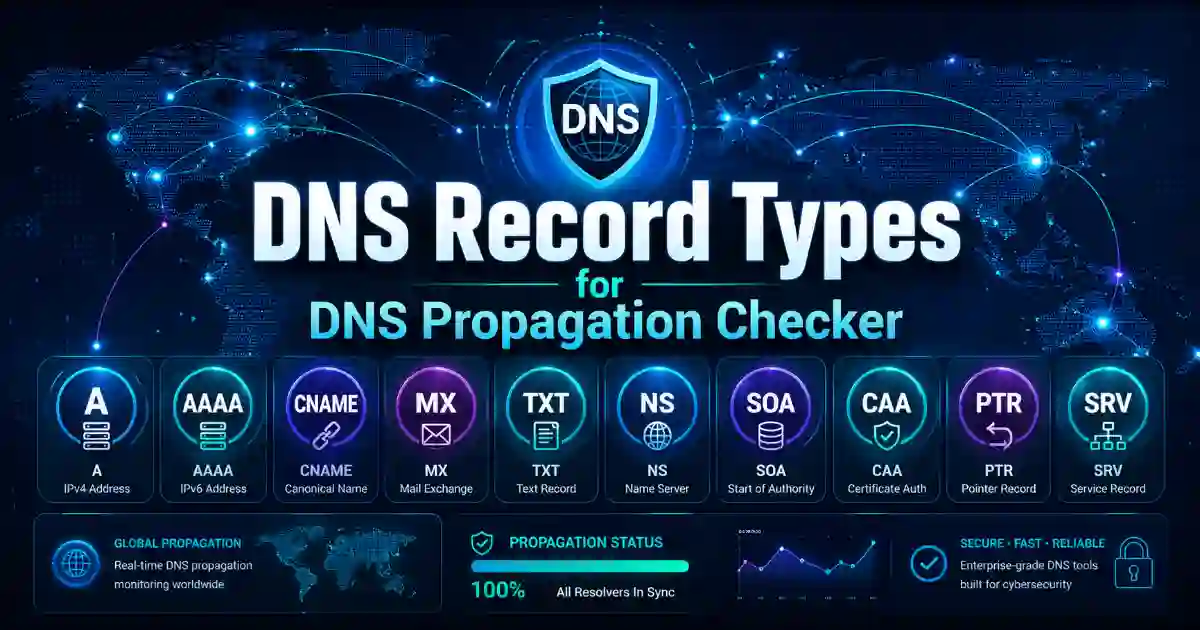
This DNS Propagation Checker supports important DNS record types used by websites, email systems, SSL certificates, domain verification, nameservers, and modern web services.
A Record
An A record points your domain to an IPv4 address. If your website moved to a new hosting server, this is usually the first record to check.
AAAA Record
An AAAA record points your domain to an IPv6 address. IPv6 is used by many modern hosting providers and networks.
CNAME Record
A CNAME record points one hostname to another hostname. It is commonly used for www domains, CDNs, landing pages, SaaS platforms, and subdomains.
MX Record
An MX record controls email delivery. If your email is not receiving messages, check your MX records first.
TXT Record
A TXT record stores text-based DNS information. It is commonly used for SPF, DKIM, DMARC, Google verification, Microsoft verification, and other domain ownership checks.
NS Record
An NS record shows which nameservers control your domain. This is important because many users edit DNS records in the wrong place.
CAA Record
A CAA record controls which certificate authorities can issue SSL certificates for your domain. If SSL is not issuing correctly, this record may be part of the problem.
SOA Record
An SOA record contains authority information about the DNS zone. It is useful for technical checks and DNS administration.
DNSSEC Records
DS and DNSKEY records are used for DNSSEC. DNSSEC helps protect DNS responses and improves trust in DNS results.
HTTPS and SVCB Records
HTTPS and SVCB records are modern DNS records used for service connection information. These records are becoming more important for future web performance and service discovery.
Examples: How to Use This Tool
Example 1: Website Moved to a New Server
You changed your hosting provider and received a new IP address.
Enter your domain, select the A record, and compare the result with your new IP address.
If some resolvers show the old IP and others show the new IP, DNS propagation is still in progress.
Example 2: Email Is Not Working
You changed your email provider to Google Workspace, Microsoft 365, Zoho Mail, or another email service.
Check your MX records first. Then check TXT records for SPF, DKIM, and DMARC.
If these records are missing or incorrect, email delivery may fail.
Example 3: Domain Verification Is Failing
You added a TXT record for Google Search Console, Microsoft 365, Google Workspace, or another service.
Use this tool to check whether the TXT record is visible.
If the TXT record is not found, it may be added to the wrong DNS provider or wrong hostname.
Example 4: SSL Certificate Is Not Issuing
If your SSL certificate provider cannot issue a certificate, check your CAA record.
A wrong CAA record may block the certificate authority from issuing SSL for your domain.
Example 5: CDN Is Not Connecting
If you connected a CDN or SaaS platform, check your CNAME record.
Make sure your hostname points to the correct target.
DNS Troubleshooting Checklist
Before changing DNS records again, check these points.
Confirm your active nameservers.
Make sure you are editing DNS at the correct provider.
Check the exact hostname, such as example.com, www.example.com, mail.example.com, or app.example.com.
Choose the correct record type.
Compare the result with the expected value.
Check TTL and wait if propagation is still in progress.
Do not change the same record again and again too quickly.
Contact your DNS provider if all results still show the wrong value after enough time.
Fast Loading and Mobile-Friendly Design
This tool page should be fast, clean, and easy to use on mobile devices. Many users check DNS issues while fixing a live website, email problem, or client project.
The tool should load at the top, work without login, and show results clearly. A good user experience helps visitors solve the problem quickly and stay on the page longer.
Core Web Vitals matter because users expect fast loading, smooth interaction, and stable layout. A lightweight design is better than heavy effects, unnecessary popups, or slow scripts.
Copy Result Button
A Copy Result button is useful because many users need to share DNS results with someone else.
They may need to send the result to a hosting provider, developer, client, support team, or coworker. A copy button saves time and makes the tool more helpful.
Privacy and Safety
This DNS Propagation Checker is designed for public use.
No login is required.
We do not store your input.
The tool checks DNS records and shows the result.
DNS records are generally public, but users should still avoid entering private tokens or confidential information unless those values are already meant to be public DNS records.
Related Tools
Use these related cybersecurity tools to solve more website, DNS, email, and security problems.
DNS Lookup Tool
Use the DNS Lookup Tool to check DNS records for a domain and understand what each record means.
SSL Certificate Checker
Use the SSL Certificate Checker to check SSL expiry, issuer, HTTPS status, and certificate problems.
What Is My IP Address
Use this tool to find your public IP address, ISP, and basic network details.
Internal link:
https://cybersecuritytime.com/what-is-my-ip-address/
Hash Generator
Use the Hash Generator to create MD5, SHA-1, SHA-256, SHA-384, SHA-512, HMAC, and checksum results.
Base64 Encoder Decoder
Use this tool to encode or decode Base64 text quickly and safely.
Helpful External Resources
RFC 9460 HTTPS and SVCB DNS Records
FAQ
What is a DNS Propagation Checker?
A DNS Propagation Checker is a tool that checks how DNS records for a domain appear across different DNS resolver views. It helps you see whether a DNS change is visible, still propagating, or possibly misconfigured.
How long does DNS propagation take?
DNS propagation can take a few minutes to 24–48 hours. The exact time depends on TTL, DNS caching, nameserver updates, registrar behavior, and network conditions.
Why is my website still showing the old server?
Your DNS resolver may still be showing a cached old A record or CNAME record. Use this DNS Propagation Checker to compare the result with your new hosting IP address or hostname.
Why is my email not working after DNS changes?
Email problems often happen because MX, SPF, DKIM, or DMARC records are missing, incorrect, or not visible yet. Check MX and TXT records to confirm your email DNS settings.
Can this tool fix DNS automatically?
No. This tool checks DNS status and explains the result. To fix DNS problems, update records inside your active DNS provider, such as your registrar, hosting panel, Cloudflare, or managed DNS service.
Is this DNS Propagation Checker private?
Yes. No login is required, and we do not store your input.
Which DNS record should I check after moving a website?
After moving a website, check A, AAAA, CNAME, NS, and CAA records. If you also changed email services, check MX and TXT records.
What does TTL mean?
TTL means Time To Live. It tells DNS resolvers how long they may cache a DNS response before requesting a fresh result.
Why do different countries show different DNS results?
Different DNS resolvers and networks may refresh cached DNS records at different times. This can make a DNS update appear complete in one region but incomplete in another.
Do beginners need technical knowledge to use this tool?
No. This DNS Propagation Checker is made for beginners and professionals. It gives simple results, clear explanations, and practical troubleshooting steps.