
Free online cybersecurity tool
WHOIS/RDAP Lookup Tool
Check public registration data for a domain, URL, IP address, or ASN. Get registrar, expiry, status codes, nameservers, DNSSEC, abuse contact, registry notices, and raw RDAP JSON in one clean report.
Lookup Result
Recommended next steps
View raw RDAP JSON
What this WHOIS/RDAP result means
RDAP is the modern registration data lookup method. It returns structured results, so users can quickly understand who manages a domain or internet number resource, whether the record is active, when a domain may expire, and where abuse reports can be sent when public contacts are available.
How to use this tool
- Enter a domain such as
example.com, a full URL, an IP address, or an ASN such asAS15169. - Keep Auto detect selected for normal use, or choose Domain, IP address, or ASN manually.
- Click Check Now and review the summary, risk hints, status meanings, and raw JSON.
- Use Copy result, Copy JSON, or Download .txt when you need evidence for support, cybersecurity, SEO, or domain transfer work.
Common reasons people use WHOIS/RDAP lookup
- Check if a domain is close to expiry before a website or business email outage.
- Confirm registrar and nameservers before moving DNS, hosting, or email.
- Understand domain status codes that may block transfers or DNS updates.
- Find public abuse contacts for phishing, malware, spam, fake websites, or impersonation.
- Check IP or ASN ownership for network troubleshooting, log review, and incident response.
FAQ
Is RDAP the same as WHOIS?
No. WHOIS is the older text-based lookup style. RDAP is the modern structured protocol that returns JSON and is easier for tools, browsers, and people to understand.
Why is domain owner information hidden?
Many registries and registrars redact personal registrant data for privacy, policy, or legal reasons. This tool only displays public information returned by the RDAP server.
Can this tool tell me if a domain is available?
If no public RDAP record is found, the domain may be available, reserved, blocked, unsupported by that server, or temporarily unavailable. Confirm availability with a registrar before buying.
Does this plugin store searches?
No. The plugin does not save lookup input or RDAP results in your WordPress database. It uses temporary hashed rate-limit keys and caches public IANA RDAP bootstrap files.
Why do some country-code domains show limited data?
Different country-code registries publish different fields. Some return only basic status, while others publish registrar, dates, nameservers, DNSSEC, notices, and abuse contacts.
Privacy note: We do not store your input.
WHOIS RDAP Lookup Tool
Use this free WHOIS RDAP Lookup tool to check public domain, IP address, IPv6, and ASN information in seconds. Enter a domain like example.com, an IP like 8.8.8.8, or an ASN like AS15169, and get useful details such as registrar, expiry date, nameservers, DNSSEC status, domain status, IP ownership, and abuse contact information.
This free public tool is fast, mobile-friendly, and easy to use.

What is WHOIS RDAP Lookup?
WHOIS RDAP Lookup is a modern way to check public registration information for domains and internet resources. It helps you understand who manages a domain, when it may expire, which nameservers it uses, and whether important security-related details are available.
This tool is useful for website owners, developers, bloggers, cybersecurity students, IT teams, domain buyers, SEO professionals, and anyone who wants quick public information about a domain, IP address, or ASN.
Instead of showing confusing technical data only, this tool gives you readable results and explains what those results mean.
How to Use This Tool
Using the WHOIS RDAP Lookup tool is simple:
- Enter a domain, IP address, IPv6 address, or ASN.
- Click the lookup button.
- Review the result summary.
- Check registrar, expiry, nameservers, DNSSEC, status, and abuse contact.
- Use the Copy result button if you want to save or share the result.
Examples
You can try:
example.com
google.com
cloudflare.com
8.8.8.8
2001:4860:4860::8888
AS15169
The tool is designed to work quickly on desktop and mobile devices, so users can check results without unnecessary delay.
What This Tool Can Check
Domain Registrar
The registrar is the company that manages the domain registration. If you own the domain, this is usually where you renew it, update nameservers, enable transfer lock, or manage domain settings.
Expiry Date
The expiry date shows when the domain may expire if it is not renewed. This is very important for website owners. If a domain expires, the website, email, SSL, and business services connected to that domain may stop working.
Registration Date
The registration date shows when the domain was created or registered. This can be helpful when checking domain age, researching a website, or reviewing a domain before buying it.
Nameservers
Nameservers show where the domain’s DNS records are managed. If your website is not opening or your email is not working, nameservers are one of the first things to check.
For deeper DNS checking, use the DNS Lookup Tool or DNS Propagation Checker.
DNSSEC Status
DNSSEC helps protect DNS responses from some types of tampering. If DNSSEC is enabled, it can add an extra layer of trust to domain name resolution.
Domain Status
Domain status codes can show whether a domain is active, locked, on hold, in redemption, or pending delete. These details help explain why a domain may not be working, why it cannot be transferred, or why urgent action may be needed.
Abuse Contact
Abuse contact information is useful when reporting phishing, spam, malware, fake websites, or harmful activity linked to a domain or IP address.
IP and ASN Details
This tool can also help check public information for IP addresses and ASNs. This is useful for cybersecurity checks, network research, hosting investigation, and suspicious traffic review.
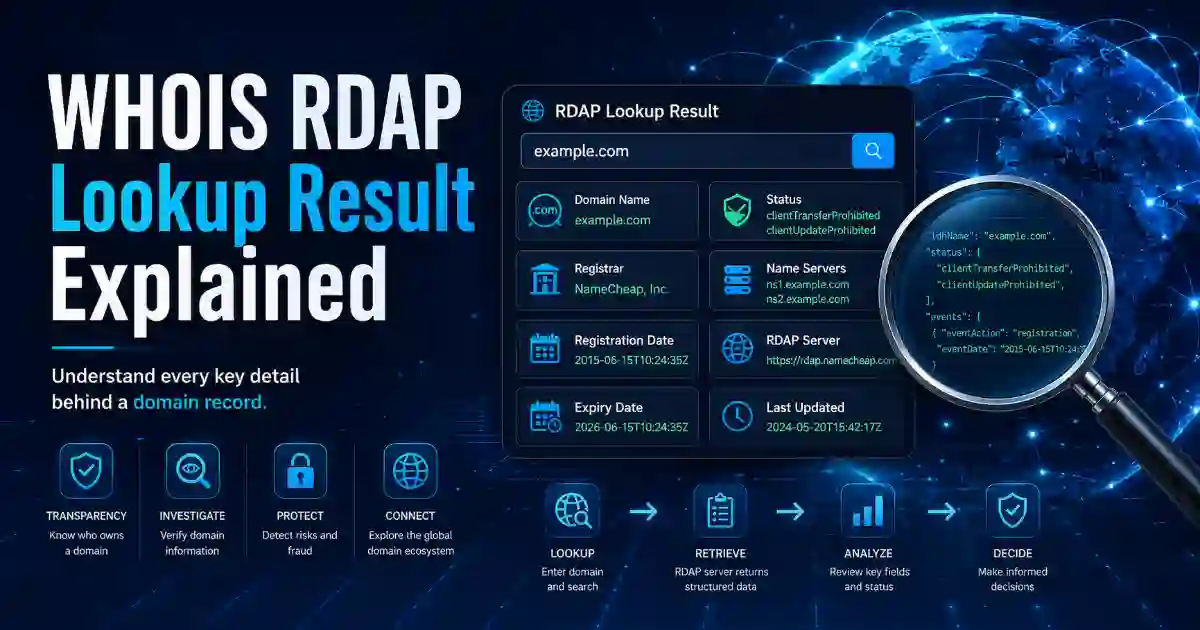
What the Result Means
A good lookup tool should not only show output. It should help users understand the result.
If the result shows a registrar, you can see which company manages the domain.
If the expiry date is close, the domain owner should renew it quickly.
If the nameservers look different from the expected DNS provider, the domain may be using a different DNS service.
If DNSSEC is enabled, the domain may have extra DNS security protection.
If the domain has a transfer lock, it may be protected from unauthorized transfer.
If the domain shows hold, redemption, or pending delete, the owner may need urgent help from the registrar.
If an abuse contact is available, it can be used to report suspicious activity.
This makes the tool helpful for both beginners and technical users.
Common Problems This Tool Helps Solve
My Domain May Expire Soon
Use the WHOIS RDAP Lookup result to check the expiry date. If your domain is important, renew it early and enable auto-renewal.
My Website Is Not Opening
Check the domain status and nameservers. If nameservers are incorrect, your DNS may be pointed to the wrong provider.
My DNS Change Is Not Showing
RDAP can show nameserver information, but DNS propagation is different. Use the DNS Propagation Checker to see if your DNS changes are updated worldwide.
My Website Shows a Security Warning
A WHOIS RDAP check can confirm domain details, but SSL issues need a certificate check. Use the SSL Certificate Checker to check HTTPS and certificate problems.
I Found a Suspicious Domain or IP
Check registrar, nameservers, abuse contact, IP ownership, ASN details, and status codes. Copy the result if you need to report abuse or save evidence.
I Want to Buy a Domain
Before buying a domain, check its public registration details, expiry date, registrar, and status. This helps you avoid basic mistakes before making a purchase decision.
Why Owner Information May Be Hidden
Many users expect a lookup tool to show the domain owner’s name, email, phone number, and address. Today, this information is often hidden or redacted for privacy reasons.
This is normal. Privacy laws, registry policies, and registrar rules may limit public owner information. Missing owner details do not always mean a domain is unsafe.
In many cases, the most useful public details are registrar, expiry date, nameservers, domain status, DNSSEC, and abuse contact information.
User Experience and Performance
This tool page should be simple, fast, and helpful. The tool should appear at the top of the page so users can start immediately without scrolling.
For a better experience, the page should include:
- Tool at the top
- No login requirement
- Fast loading design
- Mobile-friendly layout
- Copy result button
- Clear result explanation
- FAQ section
- Related tools section
- Internal links to useful cybersecurity tools
- Privacy note: We do not store your input
Google recommends helpful, reliable, people-first content. Core Web Vitals also matter because real users care about loading speed, interactivity, and layout stability. A tool page should not feel heavy, slow, or confusing.
Related Cybersecurity Tools
Use these related tools for more checks:
DNS Lookup Tool — check DNS records such as A, AAAA, CNAME, MX, TXT, NS, SPF, DMARC, and more.
DNS Propagation Checker — check whether DNS changes are updated or still propagating.
SSL Certificate Checker — check SSL certificate validity, expiry date, issuer, and HTTPS problems.
What Is My IP Address — find your public IP address and basic network details.
Hash Generator — generate MD5, SHA-1, SHA-256, SHA-384, SHA-512, HMAC, and file checksum results.
Base64 Encoder Decoder — encode and decode Base64 text safely.
Password Generator — create strong passwords, passphrases, and PINs.
Helpful External Resources
You can also learn more from official resources:
ICANN RDAP Information
ICANN Lookup
IANA RDAP Bootstrap Registry
Google Search Essentials
Google Image SEO Best Practices
FAQ
What is WHOIS RDAP Lookup?
WHOIS RDAP Lookup is a tool that checks public registration data for domains, IP addresses, IPv6 addresses, and ASNs. It can show registrar, expiry date, nameservers, DNSSEC, domain status, abuse contact, and raw RDAP data.
Is this tool free?
Yes. This WHOIS RDAP Lookup tool is free to use and does not require login.
Does this tool store my search?
No. We do not store your input.
Can I check domain expiry?
Yes. If the RDAP record includes an expiry date, the tool can show when the domain may expire.
Can I check who owns a domain?
You can check available public registration data. However, personal owner information may be hidden or redacted because of privacy rules.
Why is domain owner information missing?
Owner information may be hidden by privacy laws, registrar policy, or registry rules. This is common and does not always mean the domain is suspicious.
Can I check IP address ownership?
Yes. This tool supports IP address and ASN lookup when public RDAP data is available.
What should I do if my domain is close to expiry?
Renew it through your registrar as soon as possible. For important domains, enable auto-renewal and keep your payment method updated.
What should I do if nameservers are wrong?
Log in to your registrar or DNS provider and update the nameservers. After updating, use the DNS Propagation Checker to monitor the change.
Who should use this tool?
Website owners, domain buyers, developers, cybersecurity users, IT teams, bloggers, SEO professionals, hosting users, and anyone who needs public domain or IP registration information can use this tool.