
Free public cybersecurity tool
Security Headers Checker
Check modern HTTP security headers, understand missing protections, and get practical fixes for safer public websites.
How to use this tool
- Paste a public website URL.
- Click Check Headers to scan the live HTTP response.
- Review the grade, missing headers, warnings, and priority fixes.
- Copy, print, or download the report for your developer or hosting provider.
What the result means
Security headers are browser instructions. They can help reduce clickjacking, content injection, data leakage, insecure transport, and risky cross-origin behavior. A weak result does not prove a website is hacked, but it shows where browser-side protection can be improved.
Headers checked
The score focuses on practical public website protections and gives higher priority to HTTPS, HSTS, Content-Security-Policy, frame protection, and X-Content-Type-Options.
Related tools
FAQ
Is this Security Headers Checker free?
Yes. Visitors can scan public URLs without creating an account.
Do you store scanned URLs?
No. This plugin does not save visitor input or scan history in the WordPress database.
Which headers are most important first?
Start with HTTPS, Strict-Transport-Security, Content-Security-Policy, frame protection, and X-Content-Type-Options. Then improve privacy and cross-origin isolation headers after testing.
Can this tool fix my website automatically?
No. It is a checker and education tool. It shows what is missing and gives fix guidance so your developer, hosting provider, CDN, or security team can apply the right configuration.
Why are some public websites not A+?
Some headers require careful testing because they can affect scripts, embeds, payments, analytics, fonts, APIs, and third-party content. A staged rollout is safer than blindly copying strict settings.
Privacy note: We do not store your input.
Privacy note: We do not store your input.
Security Headers Checker: Check Website Security Headers Online
Use this free Security Headers Checker to test whether your website has important HTTP security headers enabled. These headers help browsers protect visitors from common risks such as clickjacking, unsafe scripts, MIME sniffing, weak referrer privacy, and unwanted browser permissions.
The tool is fast, mobile-friendly, and simple to use. Enter your website URL, check the result, copy the report, and understand what each result means. No access is required.

What is a Security Headers Checker?
A Security Headers Checker is an online tool that scans a website and shows whether important website security headers are present, missing, or weak.
Security headers are sent by your website server, hosting provider, CDN, or security plugin. They are not usually visible on the page, but they help browsers decide how to handle your website safely.
Your website may already have an SSL certificate, but that does not always mean your browser security headers are properly configured. This tool helps you check those hidden protections quickly.
How to Use This Tool
Using this Security Headers Checker is simple:
- Enter your website URL, for example:
https://example.com - Click the check button.
- Review your score and security grade.
- Check which headers are passed, missing, or weak.
- Read the explanation below each result.
- Use the Copy Result button to save or share the report.
- Send the result to your developer, hosting provider, CDN provider, or security team.
After fixing missing headers, scan your website again to confirm the changes are working.
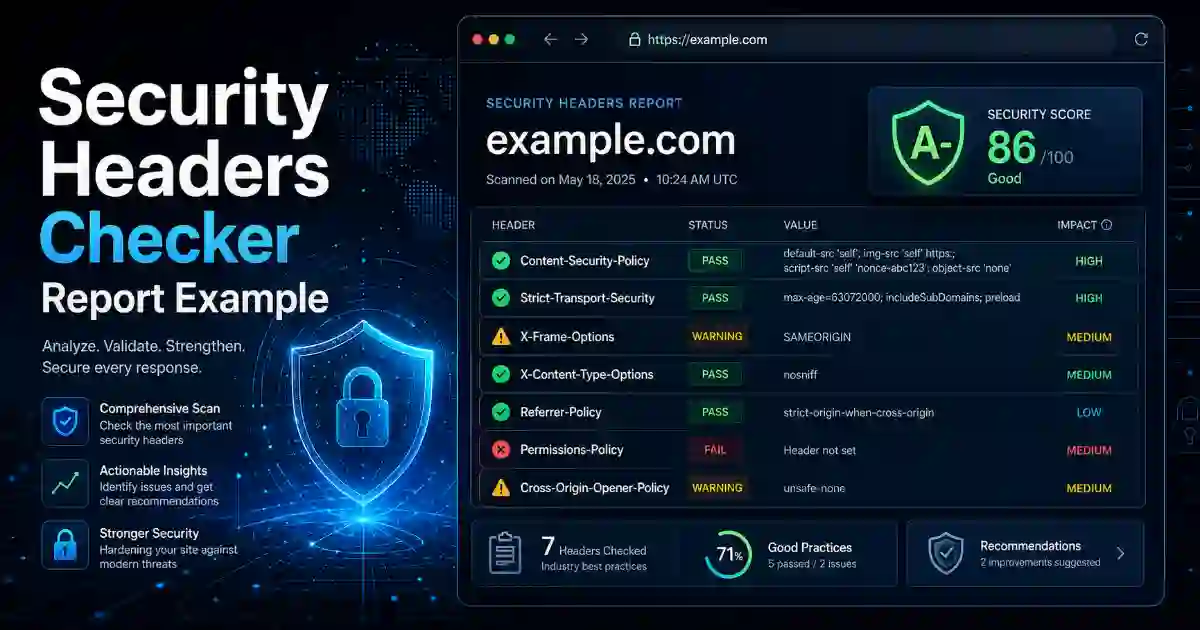
What This Tool Checks
This tool checks important HTTP security headers, including:
- Strict-Transport-Security — helps force browsers to use HTTPS.
- Content-Security-Policy — helps control which scripts, images, fonts, and frames can load.
- X-Frame-Options — helps protect against clickjacking.
- X-Content-Type-Options — helps stop browsers from guessing unsafe file types.
- Referrer-Policy — controls how much referrer information is shared.
- Permissions-Policy — controls access to browser features like camera, microphone, and location.
- Cross-Origin-Opener-Policy — helps isolate browser windows.
- Cross-Origin-Embedder-Policy — helps control cross-origin resources.
- Cross-Origin-Resource-Policy — helps protect resources from unwanted cross-origin use.
The result is not only technical output. It also explains what each header means and why it matters.
What Your Result Means
Your scan result helps you understand your website’s browser security status.
| Result | Meaning | Recommended Action |
|---|---|---|
| Passed | The header is present and useful | Keep it active and retest after major changes |
| Warning | The header exists but may be weak | Review the recommendation and improve it |
| Missing | The header was not found | Add it through hosting, CDN, server, or security plugin |
A low score does not always mean your website is hacked. It means your website may be missing protections that modern browsers can use to protect visitors.
Why Security Headers Matter
Security headers help solve real website problems. They can reduce the chance of:
- Website pages being loaded inside harmful frames
- Browsers accepting unsafe file types
- Too much visitor referrer data being shared
- Third-party scripts running without control
- Sensitive browser features being available when not needed
- Visitors reaching an insecure HTTP version of your website
For website owners, this tool gives a quick way to check whether basic browser-level protection is active. For developers, it provides a useful report that can guide security improvements.
Common Problems This Tool Helps Find
Many websites look normal but still miss important security headers. This tool can help find problems such as:
- SSL is active, but HSTS is missing.
- Content-Security-Policy is not configured.
- The website can be loaded inside another site’s iframe.
- Referrer privacy is weak.
- Browser permissions are not restricted.
- A CDN or hosting change removed security headers.
- WordPress security settings are incomplete.
Checking your headers after website updates, plugin changes, hosting migration, CDN setup, or SSL installation is a smart habit.
How to Improve Your Website Security Headers
Start with the most important fixes first.
1. Make sure HTTPS works correctly
Your website should load with HTTPS, and HTTP traffic should redirect to HTTPS.
Related tool:
SSL Certificate Checker
2. Add HSTS carefully
HSTS helps browsers remember to use HTTPS. Before using advanced preload settings, make sure your domain and subdomains work properly over HTTPS.
3. Configure Content-Security-Policy
CSP is powerful, but it should be tested carefully. A strict CSP can break ads, analytics, forms, fonts, videos, payment pages, or access systems if configured incorrectly.
4. Prevent clickjacking
Use X-Frame-Options or CSP frame-ancestors to control whether other websites can embed your pages.
5. Add Referrer-Policy
Referrer-Policy helps reduce unnecessary sharing of full URLs when users click from your website to another website.
6. Add Permissions-Policy
Permissions-Policy helps limit browser features your website does not need, such as camera, microphone, geolocation, and payment access.
Image Placement Recommendation
Add one image near the top of the page.
Related Cybersecurity Tools
Use these related tools to check more website, DNS, domain, and security details:
- SSL Certificate Checker — check SSL certificate validity and expiry.
- DNS Lookup Tool — check DNS records for a domain.
- DNS Propagation Checker — check whether DNS changes are updated worldwide.
- WHOIS RDAP Lookup Tool — check domain registration details.
- What Is My IP Address — find your public IP address.
- Password Generator — create strong passwords and passphrases.
- Hash Generator — generate hashes and checksums.
- Base64 Encoder Decoder — encode and decode Base64 text.
Trusted External Resources
For deeper learning, visit these trusted resources:
- OWASP Secure Headers Project
- OWASP HTTP Headers Cheat Sheet
- MDN HTTP Headers Reference
- MDN Content Security Policy Guide
These resources are useful for developers, website administrators, and security learners who want to understand HTTP security headers in more detail.
FAQ
What is a Security Headers Checker?
A Security Headers Checker is a tool that scans a website and checks whether important HTTP security headers are enabled. It helps website owners find missing protections and improve browser security.
Is this tool free?
Yes. This tool is free to use and does not require access.
Does this tool store my website URL?
No. We do not store your input.
Can this tool fix missing headers automatically?
No. The tool checks your headers and explains the result. To fix missing headers, update your hosting settings, CDN rules, server configuration, WordPress security plugin, or application code.
Does a missing security header mean my website is hacked?
No. A missing header does not mean your website is hacked. It means your website may not be using an available browser protection.
Is this useful for WordPress websites?
Yes. WordPress websites often use themes, plugins, CDNs, forms, analytics, and third-party scripts. Security headers can help improve browser-level protection.
Should I check my website regularly?
Yes. Check your website after hosting changes, CDN setup, SSL updates, plugin changes, theme updates, and major website changes.
Final Note
A Security Headers Checker gives website owners a simple way to understand hidden browser security settings. It helps you find missing headers, understand the result, and take practical action.