
Cybersecurity Incident Response Time
Cybersecurity incident response time is the time it takes to detect, review, contain, resolve, and recover from a cybersecurity issue. It shows how quickly a website owner, business, IT team, or security team can move from the first warning sign to safe recovery.
In simple words, it answers one important question:
If something suspicious happens, how quickly can you protect users, data, systems, and business trust?
This matters because many cybersecurity issues begin with small warning signs. A suspicious account access attempt, deceptive email, exposed password, website warning, unusual redirect, or ransomware-related alert may not look serious at first. But if nobody responds quickly, it can lead to downtime, data exposure, customer concerns, search engine warnings, payment risk, or expensive recovery.
This guide explains cybersecurity incident response time in a clear and practical way. It is useful for business websites, online stores, SaaS platforms, agencies, schools, nonprofits, bloggers, freelancers, IT teams, and professional service providers.
The goal is simple:
Detect early. Act calmly. Contain quickly. Recover safely. Improve after every incident.
Quick Answer
Cybersecurity incident response time is the total time needed to handle a cybersecurity issue from the first alert to safe recovery.
A strong response includes:
- noticing the warning quickly
- confirming whether it is a real issue
- limiting further impact
- resolving the root cause
- restoring clean systems
- reviewing what happened
- improving security settings
Fast response does not mean rushing without care. It means having a clear plan before an emergency happens.
Why Cybersecurity Incident Response Time Matters
Cybersecurity is not only about prevention. Prevention is important, but no website, business, or system is completely risk-free. Passwords can be exposed. Employees can receive deceptive emails. Website plugins can become vulnerable. Domain settings can change by mistake. A website can show security warnings. A device can show ransomware-related activity.
When an incident happens, time becomes one of the most important factors.
A slow response can cause:
- data exposure
- compromised business email
- ransomware-related disruption
- website security warnings
- lost sales
- broken checkout pages
- damaged customer trust
- payment risk
- legal or compliance concerns
- higher recovery cost
A fast response can help:
- secure affected accounts
- isolate affected devices
- remove suspicious files earlier
- protect users and customers
- restore clean backups
- reduce downtime
- prevent repeat incidents
- preserve business reputation
For example, if an online store receives a website security warning and responds immediately, it may protect customers and avoid long downtime. If the same warning is ignored for several days, visitors may see unsafe redirects, search engines may show warnings, and customers may stop trusting the business.
What Counts as a Cybersecurity Incident?
A cybersecurity incident is any event that may affect the confidentiality, integrity, or availability of data, systems, accounts, websites, or digital services.
Common examples include:
- compromised website
- deceptive email or access attempt
- exposed password
- ransomware-related activity
- malicious software issue
- suspicious account activity
- business email compromise
- unauthorized admin account
- exposed database
- unusual website redirect
- DNS or domain misconfiguration
- cloud account misuse
- unsafe file upload
- payment misuse attempt
- vulnerable website plugin
- unknown email forwarding rule
Some incidents are obvious, such as a ransomware-related message. Others are quiet, such as an unauthorized person reviewing emails or creating an unknown admin account.
That is why response time matters. The sooner the problem is found, the sooner the impact can be limited.
A Simple Real-World Example
Imagine a business owner receives this message from a hosting company:
“A security issue has been detected on your website.”
A weak response may look like this:
- the warning is ignored
- the website remains online with suspicious redirects
- visitors may be sent to unsafe pages
- search engines may flag the site
- customers may lose trust
- cleanup becomes more difficult
A strong response may look like this:
- the warning is reviewed immediately
- website files are scanned
- unknown admin users are checked
- passwords are changed
- plugins and themes are updated
- suspicious files are removed
- clean backups are reviewed
- Google Search Console is checked
- monitoring is enabled after cleanup
The difference is not only technical. It affects users, revenue, reputation, and trust.
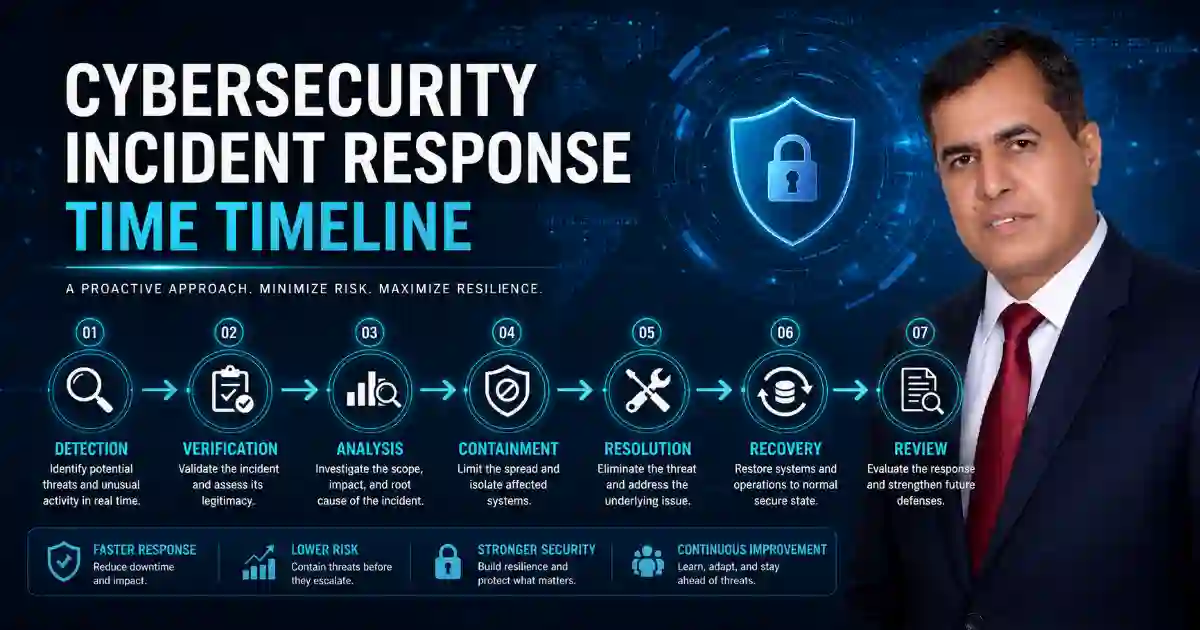
Main Stages of Incident Response
1. Detection
Detection is the moment when a possible security issue is noticed.
The warning may come from:
- a user report
- security scanner
- hosting provider alert
- firewall warning
- account activity alert
- website uptime monitor
- endpoint security tool
- payment provider warning
- Google Search Console warning
- unusual server activity
Examples of detection signs include:
- unknown account access from another location
- sudden website redirect
- new admin user
- unexpected DNS change
- unusual email forwarding rule
- failed access spike
- ransomware-related alert
- suspicious file modification
- browser warning on a website
Detection is important because you cannot resolve a threat that nobody sees.
Helpful internal tool:
Use the URL Safety Checker to review suspicious links before opening or sharing them.
2. Verification
Verification means checking whether the warning is real and how serious it is.
Not every alert is a major incident. Some alerts may be false positives. Others may be early signs of a serious security issue.
During verification, check:
- account activity history
- IP addresses
- admin users
- website files
- DNS records
- SSL status
- email rules
- server logs
- plugin activity
- firewall activity
- security scan results
Ask three questions:
Is this a real incident?
What is affected?
How urgent is it?
Helpful internal tool:
Use the DNS Lookup Tool to review DNS records, nameservers, MX records, SPF, DMARC, and domain configuration.
3. Analysis
Analysis means understanding what happened, how it happened, and what impact may have occurred.
This step prevents incomplete cleanup. If you remove only the visible problem but ignore the root cause, the issue may return.
Important analysis questions include:
- When did the suspicious activity start?
- Which account or system was first affected?
- Was any data accessed without permission?
- Were files changed?
- Were new users created?
- Were email forwarding rules added?
- Were passwords or access tokens exposed?
- Are backups clean?
- Is suspicious activity still active?
- Which weakness allowed the incident?
For example, if a WordPress site has a security issue, deleting one suspicious file may not be enough. You should also check plugin vulnerabilities, admin accounts, passwords, hosting access, file permissions, and backups.
4. Containment
Containment means limiting the issue so it does not spread or create more impact.
Containment actions may include:
- securing a compromised account
- resetting passwords
- removing active sessions
- disabling suspicious users
- isolating an affected device
- blocking suspicious IP addresses
- disabling a vulnerable plugin
- restricting admin access
- stopping unusual email forwarding
- pausing affected services temporarily
- disconnecting shared storage
Containment is often the most urgent stage. If ransomware-related activity is spreading, quick containment may protect the rest of the network. If a business email account is compromised, quick containment may reduce payment risk, data exposure, and further deceptive messages.
5. Resolution
Resolution means removing the issue and closing the access path that caused it.
This may include:
- removing suspicious files
- deleting unauthorized scripts
- updating vulnerable software
- removing unknown admin users
- changing compromised passwords
- revoking exposed access tokens
- fixing insecure settings
- removing suspicious email rules
- cleaning affected website files
- replacing compromised keys
- rebuilding affected systems
The purpose of resolution is not only to clean the visible issue. It is to make sure the same problem does not return easily.
6. Recovery
Recovery means restoring normal operations safely.
Recovery may include:
- restoring clean backups
- rebuilding affected systems
- testing website pages
- checking forms and checkout pages
- verifying email access
- reviewing SSL and DNS settings
- checking search engine warnings
- monitoring for repeat issues
- confirming customer-facing services work correctly
Recovery should not be rushed. Restoring a website or system without fixing the root cause can bring the same problem back.
Helpful internal tool:
Use the SSL Certificate Checker after recovery to confirm HTTPS, certificate validity, and secure connection status.
7. Post-Incident Review
A post-incident review is where the organization learns from the incident.
This step should answer:
- What happened?
- How was it detected?
- How long did detection take?
- How long did containment take?
- What caused the incident?
- What delayed the response?
- Were backups available?
- Was communication clear?
- Which controls failed?
- What should be improved?
This stage is important because every incident should improve future readiness.
Key Cybersecurity Response Time Metrics
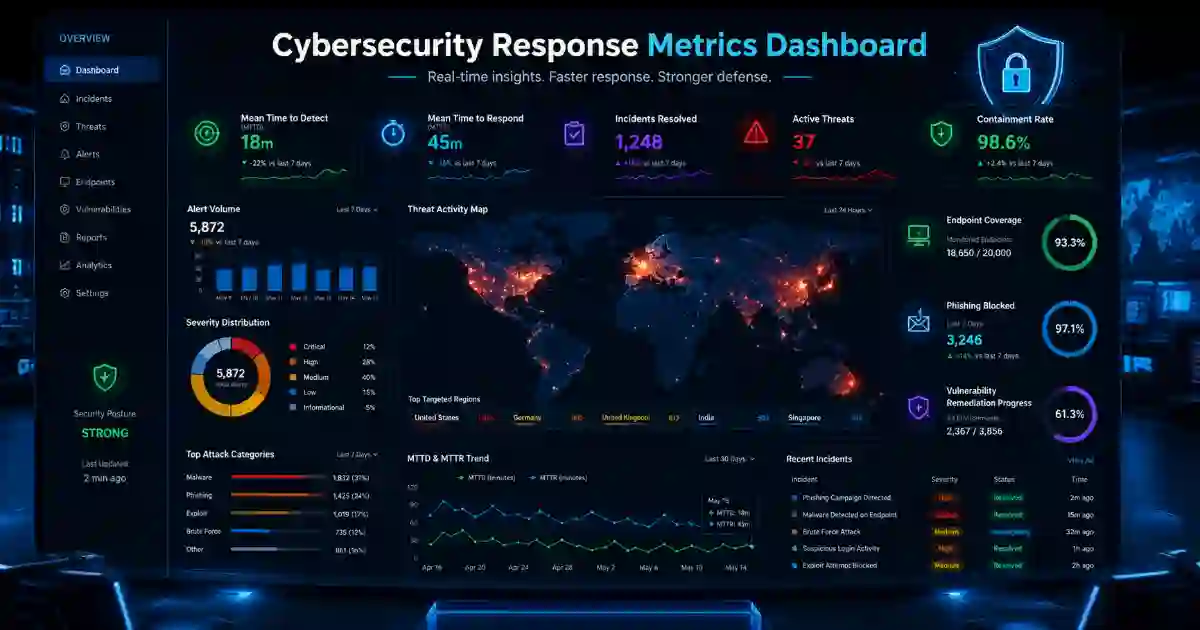
Security teams use response metrics to understand where delays happen. These metrics are also useful for small businesses and website owners because they show whether security readiness is improving.
Mean Time to Detect
Mean Time to Detect, also called MTTD, measures how long it takes to discover a security threat.
Example:
A suspicious account access attempt happens at 9:00 AM. The alert is reviewed at 9:25 AM. The detection time is 25 minutes.
A lower MTTD is better because it means threats are discovered faster.
To reduce MTTD:
- enable account activity alerts
- monitor website file changes
- use security scanning
- review server logs
- monitor cloud accounts
- check admin activity
- review hosting alerts
- train users to report suspicious activity
Mean Time to Respond
Mean Time to Respond, also called MTTR, measures how long it takes to act after a threat is detected.
Example:
A security alert appears at 10:00 AM. The affected device is isolated at 10:20 AM. The response time is 20 minutes.
To reduce MTTR:
- create a response plan
- assign clear responsibility
- prepare emergency contacts
- document common response steps
- test password reset procedures
- prepare backup restoration steps
- use clear escalation rules
Mean Time to Contain
Mean Time to Contain, also called MTTC, measures how long it takes to stop the threat from spreading.
Example:
A business email account is compromised. The account is secured, active sessions are removed, and the password is reset within 15 minutes. The containment time is 15 minutes.
To reduce MTTC:
- use multi-factor authentication
- limit administrator access
- remove unused accounts
- segment important systems
- prepare firewall rules
- restrict sensitive files
- review permissions regularly
Dwell Time
Dwell time is the amount of time an unauthorized user remains inside a system before being detected or removed.
Long dwell time is dangerous because a threat actor may:
- review emails
- access sensitive data
- collect passwords
- create hidden accounts
- add unauthorized files
- move across systems
- prepare ransomware-related activity
- change security settings
To reduce dwell time, use monitoring, strong access controls, regular account reviews, and fast investigation of suspicious activity.
Recovery Time
Recovery time measures how long it takes to safely restore normal operations after an incident.
Recovery time depends on:
- backup quality
- hosting support
- system complexity
- available staff
- incident severity
- documentation
- clean restore points
- access to technical support
Fast recovery is difficult if backups are missing, outdated, affected by the same issue, or never tested.
Practical Cyber Incident Examples
Example 1: Business Email Compromise
A staff member enters an email password on a fake access page. An unauthorized user enters the mailbox and creates an email forwarding rule.
A weak response:
- the account alert is ignored
- the password is not changed
- email forwarding remains active
- unauthorized payment requests are sent
- customers receive incorrect payment instructions
A strong response:
- suspicious account activity is detected quickly
- the account is secured
- the password is reset
- active sessions are removed
- email forwarding rules are checked
- multi-factor authentication is enabled
- affected contacts are warned if needed
- the deceptive email source is reviewed
Helpful internal tool:
Use the Email Breach Checker to check whether an email address may have appeared in known breach data.
Example 2: WordPress Website Security Issue
A website starts redirecting visitors to suspicious pages. This may happen because of an outdated plugin, weak password, affected theme file, or unauthorized admin user.
A weak response:
- only the visible redirect is removed
- plugins remain outdated
- unknown admin users are ignored
- passwords are not changed
- the issue returns later
A strong response:
- website files are scanned
- unknown users are removed
- plugins and themes are updated
- admin passwords are changed
- hosting logs are reviewed
- a clean backup is restored if needed
- Google Search Console warnings are checked
- monitoring is enabled
Helpful internal tool:
Use the Security Headers Checker to review important browser-level security headers after cleanup.
Example 3: Ransomware-Related Warning
A device starts encrypting files or behaving strangely.
A weak response:
- the device stays connected
- shared folders remain accessible
- backups are exposed
- more systems may be affected
A strong response:
- the affected device is isolated
- shared storage access is stopped
- other systems are checked
- clean backups are protected
- suspicious indicators are reviewed
- recovery starts after containment
- the original entry point is investigated
Fast containment can reduce the difference between one affected device and a wider business disruption.
Example 4: DNS or Domain Problem
A business website suddenly stops loading after a DNS change. Email delivery also becomes unreliable.
A weak response:
- the wrong DNS dashboard is checked
- nameservers are not verified
- MX records remain incorrect
- SSL renewal fails
- users cannot reach the website
A strong response:
- nameservers are checked
- A, CNAME, MX, TXT, SPF, DMARC, and CAA records are reviewed
- recent DNS changes are compared with provider instructions
- website and email services are tested
- SSL certificate status is checked after DNS correction
Helpful internal tool:
Use the WHOIS RDAP Lookup Tool to review domain registrar, nameserver, expiry, and public domain details.
What to Do in the First 15 Minutes
The first few minutes can decide how serious an incident becomes. Use this simple response flow.
If an account is compromised
- Secure the account.
- Reset the password.
- Remove active sessions.
- Check multi-factor authentication settings.
- Review email forwarding rules.
- Check recent access locations.
- Review sent messages or file access.
If a website shows a security warning
- Do not ignore the warning.
- Scan website files.
- Check admin users.
- Review plugin and theme updates.
- Change admin passwords.
- Review hosting logs.
- Restore a clean backup if needed.
- Monitor after cleanup.
If ransomware-related activity is suspected
- Disconnect the affected device.
- Stop access to shared folders.
- Protect backups.
- Do not restore before containment.
- Check other systems.
- Document what happened.
- Get professional help if needed.
If DNS or domain settings change unexpectedly
- Check nameservers.
- Review recent DNS changes.
- Verify domain registrar access.
- Check MX records for email.
- Check SSL status.
- Confirm website and email services.
How to Reduce Cybersecurity Incident Response Time
Create a Simple Written Response Plan
A response plan should explain what to do when something goes wrong.
It should include:
- incident owner
- emergency contacts
- hosting support contact
- domain registrar access
- DNS access
- website admin access
- email administrator access
- backup location
- password reset steps
- customer communication process
- recovery steps
A simple plan that people can follow is better than a complex document nobody uses.
Use Multi-Factor Authentication
Multi-factor authentication helps protect accounts even when passwords are exposed.
Use it on:
- email accounts
- hosting accounts
- website admin panels
- cloud storage
- payment accounts
- domain registrar accounts
- business tools
- social media accounts
For business websites, one compromised admin account can affect customers, payments, private files, and brand trust.
Keep Clean and Tested Backups
Backups are essential for recovery, but they must be reliable.
Good backups should be:
- automatic
- regular
- protected
- stored separately
- tested for restoration
- available during emergencies
- kept in multiple versions
A backup that has never been tested may fail when it is needed most.
Monitor High-Risk Activity
Monitoring helps reduce detection delays.
Monitor:
- account access attempts
- failed password attempts
- new admin users
- file changes
- plugin and theme changes
- DNS changes
- SSL certificate expiry
- website uptime
- email forwarding rules
- security warnings
- server resource spikes
- suspicious outbound traffic
Monitoring turns hidden problems into visible warnings.
Limit Administrator Access
Too many admin users increase risk.
Good access control includes:
- removing unused accounts
- avoiding shared passwords
- using separate accounts for each person
- giving users only the access they need
- reviewing admin accounts regularly
- disabling old contractor or staff accounts
- protecting every admin account with multi-factor authentication
The fewer unnecessary privileges you have, the easier containment becomes.
Train Users to Report Quickly
Users often notice suspicious activity before technical teams do.
Users should report:
- deceptive emails
- strange account activity alerts
- unknown multi-factor prompts
- unexpected password reset emails
- missing files
- suspicious payment requests
- website warnings
- strange browser redirects
- unexpected account activity
The goal is not to blame users. The goal is to make reporting fast, safe, and normal.
Cybersecurity Incident Response Checklist
Use this checklist to improve response readiness:
- Enable multi-factor authentication on important accounts.
- Use strong and unique passwords.
- Remove unused administrator accounts.
- Review website admin users regularly.
- Keep software, plugins, and themes updated.
- Monitor suspicious account activity.
- Check website file changes.
- Keep tested backups.
- Store backups separately from the main system.
- Prepare an incident response plan.
- Keep emergency contacts available.
- Train users to recognize deceptive emails and suspicious access pages.
- Check email forwarding rules.
- Review DNS and domain access.
- Limit administrator permissions.
- Monitor hosting and website security notifications.
- Review SSL certificate status.
- Document every incident.
- Conduct a post-incident review.
- Improve security settings after each review.
For more support, visit the Free Cybersecurity Tools page.
Common Mistakes That Increase Response Time
Many cyber incidents become worse because basic preparation is missing.
Common mistakes include:
- no clear incident owner
- no emergency contact list
- no tested backups
- weak passwords
- missing multi-factor authentication
- ignored security alerts
- outdated plugins or software
- too many admin users
- shared passwords
- no documentation
- slow hosting support
- unclear recovery process
- no post-incident review
Fixing these issues before an incident can reduce confusion and improve recovery speed.
Related Cybersecurity Tools
The following Cybersecurity Time tools can support prevention, detection, and recovery:
- SSL Certificate Checker — check SSL validity, expiry, HTTPS redirects, and certificate trust.
- Security Headers Checker — review browser security headers after website cleanup or launch.
- DNS Lookup Tool — check DNS records, email DNS, domain settings, and propagation.
- DMARC, SPF and DKIM Checker — review email authentication records that help reduce spoofing.
- URL Safety Checker — check suspicious links before opening or sharing them.
- WHOIS RDAP Lookup Tool — check domain registrar, nameserver, expiry, and public domain details.
- Email Breach Checker — check whether an email address may have appeared in known breach data.
Trusted Learning Resources
Use these trusted resources near the bottom of the page:
- NIST Incident Response Recommendations
- CISA Cybersecurity Incident and Vulnerability Response Playbooks
- Google Search Central: Helpful, Reliable, People-First Content
- Google Search Essentials
CISA describes its playbooks as procedures to identify, coordinate, remediate, recover, and track mitigations, while Google Search documentation emphasizes helpful, reliable, people-first content and crawlable links.
Frequently Asked Questions
What is cybersecurity incident response time?
Cybersecurity incident response time is the time required to detect, review, contain, resolve, and recover from a cybersecurity incident.
Why is incident response time important?
Incident response time is important because faster action can reduce data exposure, downtime, account misuse, payment risk, recovery cost, and business disruption.
What is MTTD?
MTTD means Mean Time to Detect. It measures how long it takes to discover a security threat.
What is MTTR?
MTTR means Mean Time to Respond. It measures how long it takes to act after a threat is detected.
What is MTTC?
MTTC means Mean Time to Contain. It measures how long it takes to stop a threat from spreading or causing more impact.
What is dwell time?
Dwell time is the amount of time an unauthorized user remains inside a system before being detected or removed.
How can a website owner reduce response time?
A website owner can reduce response time by using strong passwords, multi-factor authentication, security scanning, file change monitoring, regular updates, clean backups, hosting alerts, and a written recovery process.
How can small businesses respond faster to cyber incidents?
Small businesses can respond faster by assigning responsibility, preparing emergency contacts, enabling multi-factor authentication, keeping tested backups, monitoring important accounts, and training staff to report suspicious activity quickly.
Is incident response only for large companies?
No. Incident response is important for small businesses, bloggers, online stores, agencies, schools, nonprofits, and professional websites. A single compromised account or affected website can create serious problems.
What should happen after a cyber incident?
After a cyber incident, document the timeline, identify the root cause, check what was affected, improve weak controls, update the response plan, and train users if needed.
Final Summary
Cybersecurity incident response time is a practical measure of security readiness. It shows how quickly a threat can be detected, contained, resolved, and recovered from.