AI and Incident Response Automation in 2026: Benefits, Limits and Practical Use Cases
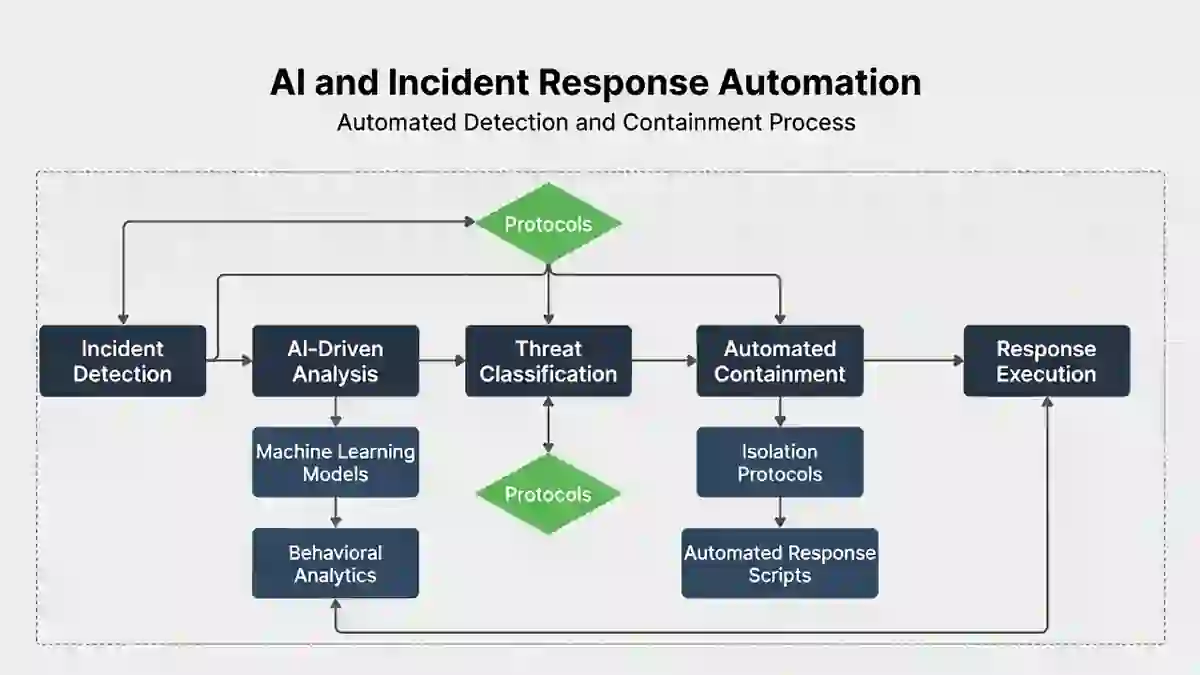
AI and incident response automation are changing how Security Operations Centers investigate and manage cyber incidents in 2026.
Security teams increasingly use:
- artificial intelligence;
- machine learning;
- behavioral analytics;
- SOAR workflows;
- security orchestration;
- automated enrichment;
- automated containment.
The objective is straightforward:
reduce the amount of time analysts spend collecting routine information so they can focus on decisions that require judgment.
But automation should not be confused with autonomous security.
A security system may be able to:
- enrich an alert;
- correlate events;
- isolate an endpoint;
- revoke a token;
- block an indicator;
- draft an incident summary.
That does not mean every action should happen automatically without human review.
The strongest incident-response programs combine:
automation speed + human judgment + predefined authority + auditability.
IBM’s 2026 Cost of a Data Breach Report found that organizations making extensive use of AI and security automation experienced an average $1.93 million lower breach cost than organizations using none.
That is meaningful evidence of business benefit.
It is not evidence that every AI security tool automatically improves security.
AI Incident Response at a Glance
| Incident-response task | AI or automation can help with | Human control still matters for |
|---|---|---|
| Alert enrichment | Pull asset, identity and threat context | Confirm relevance |
| Prioritization | Rank likely severity | Assess real business impact |
| Investigation | Correlate events and summarize evidence | Validate conclusions |
| Endpoint isolation | Execute approved containment workflow | Assess disruption risk |
| Identity containment | Revoke sessions/tokens | Handle critical/privileged identities |
| Threat hunting | Surface suspicious patterns | Interpret attacker intent |
| Reporting | Build timelines and draft summaries | Legal/regulatory review |
| Recovery | Recommend validation steps | Authorize restoration |
Table of Contents
What Is AI and Incident Response Automation?
AI-assisted incident response uses models or analytics to help analysts understand, prioritize, investigate, or act on security events.
Incident response automation uses predefined workflows to execute repeatable actions.
These concepts overlap, but they are not identical.
For example:
AI task
An AI model summarizes:
- authentication anomalies;
- endpoint events;
- suspicious cloud changes;
- threat-intelligence matches.
Automation task
A SOAR workflow:
- opens an incident;
- collects endpoint data;
- queries threat intelligence;
- disables a compromised token;
- updates the case record.
AI helps interpret.
Automation helps execute.
Common Technologies Used
Incident-response automation may integrate with:
- SIEM;
- EDR/XDR;
- identity platforms;
- cloud security tools;
- email security;
- SOAR;
- threat intelligence;
- ticketing systems;
- case-management platforms.
AWS specifically describes automation as a way to improve the speed and scalability of security response, and its incident-response tooling includes automated monitoring, triage, AI-powered investigation and containment.
Why AI-Assisted Response Matters in 2026
The threat environment is becoming faster at both ends of the spectrum.
Mandiant’s M-Trends 2026 says some cybercriminal hand-offs that once took hours can now occur in roughly 22 seconds, while other attackers remain hidden for long periods using stealthier techniques.
That creates two defender problems:
high-volume fast attacks
and:
slow, difficult-to-detect intrusions.
Manual-only security operations can struggle with both.
Automation helps by reducing repetitive work and accelerating known response paths.
AI Is Also Accelerating Attacks
AI is not only a defensive technology.
IBM’s 2026 breach research found:
- AI-driven attacks increased 56% year over year;
- one in four malicious breaches in its study were AI-enabled;
- AI-enabled breaches cost approximately $6 million on average.
IBM says AI is helping attackers increase speed, scale and precision.
This creates a simple operational problem:
human-paced defense is increasingly competing with machine-assisted attack activity.
Benefit 1: Faster Alert Enrichment
One of the safest and most useful automation opportunities is alert enrichment.
Instead of requiring an analyst to manually check:
- asset owner;
- hostname;
- IP reputation;
- user privileges;
- recent authentication;
- vulnerability status;
- threat intelligence;
an automated workflow can gather those details before the analyst opens the case.
This can reduce repetitive investigation work without immediately taking disruptive action.
Example
A suspicious PowerShell alert arrives.
Automation can automatically retrieve:
- endpoint owner;
- process tree;
- file hash reputation;
- user role;
- previous alerts;
- recent login locations.
The analyst receives one enriched case instead of six separate searches.
That improves:
triage speed
without granting the automation authority to shut down production systems.
Benefit 2: Faster Prioritization
AI can assist with ranking alerts based on:
- asset criticality;
- identity privilege;
- attack technique;
- historical patterns;
- correlated signals.
This can help reduce alert overload.
But AI-generated severity should remain a decision aid, not unquestioned truth.
A model may not know:
- that a server is supporting payroll;
- that a user is the CFO;
- that a “suspicious” process is part of an approved maintenance window.
Context still matters.
Measure Prioritization Quality
Do not measure AI prioritization only by speed.
Track:
- Critical incidents ranked correctly;
- severity overrides;
- missed High/Critical incidents;
- false escalation;
- analyst disagreement rate.
Fast wrong prioritization is not an improvement.
Benefit 3: Automated Threat Correlation
Modern incidents often create several low-confidence alerts.
Example:
unusual login
new OAuth consent
privilege change
large file download
Each event alone may look weak.
Together they may indicate account takeover.
AI and correlation engines can help connect these signals into one incident.
This is particularly valuable across:
- cloud;
- identity;
- endpoint;
- network telemetry.
Benefit 4: Faster Investigation Summaries
AI tools can help analysts summarize:
- timeline;
- affected identities;
- endpoints;
- known indicators;
- previous actions;
- outstanding questions.
This can reduce case hand-off friction.
For example, instead of a new analyst reading 150 raw events, an AI-generated summary might explain:
what happened
what evidence supports it
what still needs validation.
But analysts should verify important claims against the original evidence.
AI Summaries Can Be Wrong
Generative AI may:
- omit evidence;
- misinterpret timestamps;
- merge unrelated events;
- infer unsupported causality;
- hallucinate details.
Therefore:
AI summary ≠ forensic truth
Use AI to accelerate navigation through evidence, not replace evidence.
Benefit 5: Automated Containment
Automation can be very powerful during high-confidence incidents.
Possible automated actions include:
- isolate endpoint;
- disable user;
- revoke session;
- revoke refresh tokens;
- block domain/IP;
- quarantine email;
- rotate temporary credentials.
AWS supports automated containment patterns and dedicated containment roles within its current incident-response service and guidance.
For general containment metrics, see Mean Time to Contain.
Automated Containment Needs Guardrails
Not every alert should trigger automatic shutdown.
Imagine an AI system incorrectly isolates:
- payment gateway;
- hospital system;
- production database;
- OT controller.
The defensive action itself could create a serious outage.
Automation should therefore be categorized by risk.
Three Levels of Automation
Level 1: Low-Risk Automation
Examples:
- enrich alerts;
- create tickets;
- collect evidence;
- query reputation services.
Human approval generally unnecessary.
Level 2: Reversible Containment
Examples:
- isolate standard employee endpoint;
- quarantine email;
- revoke standard user session.
May be automatically authorized under defined conditions.
Level 3: High-Impact Action
Examples:
- shut down production;
- isolate critical infrastructure;
- disable privileged administrator;
- block enterprise-wide service.
Human approval should normally remain in the workflow unless the organization has explicitly designed otherwise.
Benefit 6: Consistent Response Playbooks
Humans may react differently under pressure.
Playbooks help standardize:
- evidence collection;
- escalation;
- containment;
- notification;
- documentation.
Automation can execute predefined steps consistently.
For example:
Confirmed phishing →
- search delivered messages;
- quarantine copies;
- block sender/domain;
- identify users who clicked;
- inspect affected accounts;
- revoke compromised sessions;
- create incident record.
This reduces improvisation.
Benefit 7: Better Audit Trails
Automation can automatically record:
- timestamp;
- alert source;
- model recommendation;
- analyst approval;
- containment action;
- outcome;
- rollback.
This improves incident reconstruction.
For regulatory or legal review, a clear timeline can be extremely valuable.
Use Data Breach Timeline Template to structure chronology consistently.
Benefit 8: Improved Threat Hunting
AI can help threat hunters query large datasets and identify unusual relationships.
Examples:
- rare process behavior;
- unusual login sequence;
- previously unseen infrastructure;
- suspicious account clustering;
- unusual cloud-resource changes.
IBM’s 2026 study says approximately 50% of breached organizations had deployed AI agents in threat hunting, response and containment, while adoption was much lower in vulnerability scanning and management.
That is a useful adoption signal, but it does not prove every AI threat-hunting implementation is effective.
Benefit 9: Faster Cloud Incident Response
Cloud environments can generate enormous amounts of distributed evidence.
Google Cloud’s 2026 Cloud Threat Horizons guidance recommends automated evidence collection, AI-augmented analysis and context-aware mitigation to address shrinking cloud-response windows.
Useful automation can collect:
- IAM activity;
- cloud audit logs;
- network events;
- workload information;
- token changes;
- API actions.
This can reduce time spent assembling evidence manually.
Benefit 10: Better Scale for SOC Teams
Security teams often face more telemetry than analysts can manually process.
Automation can perform repetitive tasks at scale.
That can allow analysts to spend more time on:
- threat interpretation;
- business impact;
- containment decisions;
- adversary behavior;
- complex investigations.
AWS explicitly recommends security automation partly because it scales as workloads and security-event volume grow.
How AI and Automation Affect MTTD, MTTA and MTTC
Automation can influence several different metrics.
| Metric | Possible benefit |
|---|---|
| MTTD | Faster anomaly recognition/correlation |
| MTTA | Better alert routing and paging |
| Triage Time | Automated enrichment |
| Validation Time | AI-assisted correlation |
| MTTR | Faster predefined response action |
| MTTC | Automated containment |
| Recovery Time | Automated validation and orchestration |
For the full metric model, see MTTD vs MTTR vs MTTC vs Dwell Time.
AI Does Not Automatically Reduce MTTD
This point matters.
If your environment lacks:
- logs;
- endpoint coverage;
- cloud telemetry;
- identity visibility;
AI cannot reliably infer events that were never collected.
A better formula is:
good telemetry + good detections + AI assistance + good workflow
rather than:
AI = automatic visibility.
AI Does Not Automatically Reduce MTTC Either
Suppose AI recommends endpoint isolation in one minute.
But:
business approval takes 45 minutes.
Your technical system is fast.
Your governance process is slow.
Measure:
recommendation → approval
and:
approval → execution
separately.
Human-in-the-Loop Response Model
A practical workflow is:
Alert
↓
Automated enrichment
↓
AI-assisted prioritization
↓
Analyst validation
↓
Preapproved low-risk automation
↓
Human approval for high-impact action
↓
Automated execution
↓
Verification
↓
Case documentation
This balances speed with accountability.
When Full Automation Makes Sense
Full automation is most suitable when:
- confidence is very high;
- action is reversible;
- business impact is low;
- playbook is tested;
- rollback exists.
Examples:
- quarantine known malicious email;
- block confirmed malicious hash;
- revoke disposable test credentials.
When Human Approval Should Remain
Human approval is especially important when actions could affect:
- patient safety;
- production;
- financial transactions;
- OT;
- customer services;
- privileged identity;
- regulated records.
Speed matters.
So does avoiding self-inflicted disruption.
AI and Evidence Preservation
Incident response is not only about stopping the attacker.
Teams may need to preserve:
- logs;
- memory;
- cloud audit records;
- endpoint artifacts;
- identity evidence.
Poor automation can overwrite or destroy evidence.
Therefore containment workflows should specify:
what evidence must be collected before or during action.
For the broader incident lifecycle, see Cybersecurity Incident Response Timeline.
AI Security Risks
AI-enabled incident response introduces its own risk.
1. Hallucination
The model generates an unsupported conclusion.
2. Prompt injection
Malicious content attempts to manipulate an AI-assisted workflow.
3. Privilege abuse
An AI agent receives excessive security permissions.
4. Data leakage
Sensitive incident information is sent to inappropriate systems.
5. Automation cascade
One incorrect detection triggers multiple damaging actions.
6. Model drift
Performance changes over time.
7. Poor explainability
Analysts cannot understand why the system recommended an action.
These risks should be part of governance.
Least Privilege for AI Agents
An AI security agent should not automatically have unrestricted ability to:
- delete systems;
- disable every account;
- modify production firewall rules;
- erase logs.
Apply:
- least privilege;
- scoped service roles;
- approval gates;
- audit logging;
- time-limited access.
Treat AI agents like privileged users.
Measure AI Automation Quality
A mature SOC should track:
| Metric | What it reveals |
|---|---|
| Analyst time saved | Efficiency |
| Triage reduction | Workflow improvement |
| MTTC improvement | Containment benefit |
| Analyst override rate | AI recommendation quality |
| False containment rate | Automation safety |
| Automation failure rate | Technical reliability |
| Rollback rate | Unintended impact |
| Missed incident rate | Detection quality |
| Evidence completeness | Investigation quality |
This is much better than simply saying:
“70% of our SOC is automated.”
Example AI Incident Response Scenario
Consider an account takeover.
09:00 — suspicious login detected.
09:01 — AI correlates unfamiliar device, impossible travel, and privilege change.
09:02 — system enriches account with role and recent activity.
09:04 — analyst validates likely compromise.
09:05 — predefined playbook revokes active sessions.
09:06 — account temporarily disabled.
09:09 — cloud tokens revoked.
09:12 — analyst verifies attacker access has stopped.
Automation shortened:
- enrichment;
- correlation;
- execution.
Human judgment still determined:
- whether the incident was credible;
- whether disabling the account was appropriate.
Example Ransomware Workflow
EDR alert
↓
AI correlates:
- encryption activity;
- credential use;
- SMB movement.
↓
Analyst validates ransomware.
↓
Automated playbook:
- isolate endpoint;
- disable compromised account;
- revoke sessions.
↓
Incident commander evaluates whether:
- network segments;
- backups;
- production services
must also be isolated.
For ransomware-specific response, see Ransomware Containment Time in 2026.
AI and Compliance Readiness
AI and automation can assist compliance workflows.
Useful functions include:
- creating incident chronology;
- preserving timestamps;
- collecting evidence;
- drafting summaries;
- identifying missing facts;
- tracking approvals.
But AI should not independently make legal determinations such as:
- SEC materiality;
- UK GDPR reportability;
- legal privilege;
- notification obligations.
These require appropriate legal and governance review.
SEC Reporting
For domestic SEC registrants, Item 1.05 disclosure is generally due within four business days after the company determines that the cybersecurity incident is material. The deadline is not automatically triggered by detection.
AI can help gather facts.
It should not be described as automatically deciding SEC materiality.
For the detailed process, see SEC Cyber Incident Disclosure Checklist.
UK Personal Data Breaches
The ICO states that certain reportable personal data breaches must be notified within 72 hours after the organization becomes aware of the breach, where feasible.
Automation can help:
- preserve chronology;
- escalate privacy teams;
- collect incident details.
But whether a breach meets the legal notification threshold remains a legal/privacy assessment.
CIRCIA
Do not state:
“CIRCIA 72-hour reporting rule”
as a generic current automation requirement unless the relevant final rule is actually in force for the organization.
Your current CIRCIA article correctly treats the issue as reporting readiness while implementation remains pending.
So in this article use:
CIRCIA readiness and future reporting workflows
rather than implying that AI must currently satisfy a universal live CIRCIA clock.
AI and Regulatory Reporting Drafts
AI can safely assist with:
- organizing incident facts;
- drafting a chronology;
- summarizing technical findings;
- checking whether required fields are incomplete.
Final regulatory language should be reviewed by:
- legal;
- privacy;
- compliance;
- executive leadership,
as applicable.
AI output is a draft.
Not the legal conclusion.
Current Evidence: IBM 2026
IBM’s latest Cost of a Data Breach research provides one of the clearest current business cases for security automation.
It reports:
$4.99 million
global average breach cost.
56% increase
in AI-driven attacks.
$1.93 million
average cost savings associated with extensive AI and automation in security versus no use.
These are useful 2026 statistics.
Do not translate them into claims such as:
“AI reduces MTTC by 60%.”
unless a source specifically provides that measurement.
Current Evidence: Google/Mandiant 2026
Mandiant’s M-Trends 2026 is based on more than 500,000 hours of incident investigations conducted in 2025.
Its findings show:
- some attacker hand-offs occur in seconds;
- attackers use AI inside compromised environments;
- stealthy intrusions can persist for long periods.
That supports the case for:
- automated collection;
- better correlation;
- rapid containment.
It does not prove that autonomous AI should replace experienced responders.
Current Evidence: AWS
AWS recommends security response automation to increase detection/response speed and scale security operations. Its current incident-response service combines:
- monitoring;
- triage;
- AI-powered investigation;
- containment;
- human incident-response expertise.
That hybrid model is important:
automation + specialist humans
rather than:
automation instead of humans.
NIST and AI in Cybersecurity
NIST released an initial public draft in August 2026 on using AI for Cybersecurity Framework 2.0 analysis and reporting.
NIST describes AI as potentially useful for analyzing, planning, implementing and monitoring progress toward CSF outcomes, while also noting that its draft is not itself a complete AI best-practices security standard.
This supports cautious use of AI for cybersecurity workflow assistance rather than unsupported claims about fully autonomous cyber governance.
Practical Automation Maturity Model
Level 1 — Manual
Analysts:
- investigate;
- enrich;
- decide;
- execute.
Level 2 — Automated Enrichment
Automation gathers context.
Humans decide and act.
Level 3 — Assisted Response
AI recommends actions.
Humans approve.
Level 4 — Guardrailed Automation
Preapproved low-risk actions execute automatically.
Humans handle exceptions.
Level 5 — Selective Autonomous Response
Highly constrained trusted playbooks operate automatically within tightly defined boundaries.
This is more realistic than assuming every SOC should aim for full autonomy.
How to Implement AI Incident Response Safely
Step 1: Start With Low-Risk Use Cases
Begin with:
- enrichment;
- summaries;
- evidence collection;
- ticket creation.
Step 2: Establish Baseline Metrics
Before automation, measure:
- MTTA;
- triage time;
- MTTC;
- analyst hours;
- false positives.
Otherwise you cannot prove improvement.
Step 3: Add Approval Gates
High-impact actions should have explicit authorization.
Step 4: Test Rollback
Every automated containment action should answer:
Can we undo this safely?
Step 5: Log Everything
Record:
- model recommendation;
- analyst decision;
- executed action;
- timestamp;
- result.
Step 6: Test Failure Scenarios
Test:
- false positive;
- unavailable API;
- wrong asset;
- stale identity;
- partial containment;
- AI hallucination.
Step 7: Review Performance Regularly
Measure whether the automation actually improves:
- speed;
- accuracy;
- containment;
- workload.
Common AI Incident Response Mistakes
1. Automating Before Fixing Bad Processes
Automation makes a bad workflow faster.
2. Giving AI Excessive Permissions
Use least privilege.
3. Trusting AI Summaries Without Validation
Always preserve source evidence.
4. Automating High-Impact Actions Too Early
Start with reversible actions.
5. Measuring Automation Volume Instead of Outcomes
Track MTTC and quality.
6. Ignoring Evidence Preservation
Containment should not destroy investigation value.
7. Letting AI Make Legal Decisions
AI can support reporting.
Legal teams decide legal obligations.
8. Assuming AI Replaces Analysts
Complex incidents still require judgment.
9. Ignoring Model and Workflow Security
AI systems themselves can become attack surfaces.
10. Failing to Test Rollback
Every high-impact automation needs an exit path.
AI Incident Response Scorecard
A useful quarterly scorecard could include:
| Measure | Before automation | After automation |
|---|---|---|
| Median alert enrichment | 18 min | 3 min |
| Median triage time | 27 min | 14 min |
| Median MTTC | 42 min | 29 min |
| Analyst override rate | — | 11% |
| Automation failure rate | — | 2% |
| False containment | — | 0.4% |
| Analyst hours per incident | 5.1 | 3.6 |
These values are illustrative, not industry benchmarks.
The purpose is to show how an organization should evaluate automation.
How AI Relates to SOC Efficiency Metrics
AI is not itself a SOC efficiency metric.
It is a capability that may influence metrics.
Track whether AI improves:
- MTTD;
- MTTA;
- triage;
- MTTC;
- backlog;
- investigation time;
- recovery.
For the broader KPI framework, see SOC Efficiency Metrics 2026.
Frequently Asked Questions
What is AI incident response automation?
It is the use of AI-assisted analysis and automated workflows to support security incident detection, investigation, prioritization, containment and documentation.
Can AI automatically contain cyber threats?
Yes, technically.
But fully automated containment should generally be limited to well-tested, high-confidence and appropriately authorized scenarios.
Does AI reduce breach costs?
IBM’s 2026 Cost of a Data Breach study reports an average $1.93 million cost saving for organizations using AI and automation extensively in security compared with those using none.
This is an association from IBM’s study population, not a guarantee for every organization.
Can AI reduce MTTD?
It may help through anomaly detection, correlation and prioritization.
Actual improvement depends on telemetry, detection quality and implementation.
Can AI reduce MTTC?
Automation can execute containment actions quickly once an incident is validated.
But approval or business-decision delays can still dominate total containment time.
Can AI replace SOC analysts?
AI can automate and accelerate many repetitive tasks, but complex incident response still requires human judgment, organizational context and accountability.
Should AI make SEC materiality decisions?
No.
AI may help collect and summarize facts, but SEC materiality requires appropriate management/legal analysis. The SEC’s four-business-day Item 1.05 clock is tied to materiality determination, not automated alert generation.
Can AI prepare a UK breach notification?
It can assist with chronology and drafting, but the organization still needs to determine whether the breach meets the legal reporting threshold. The ICO generally requires notification of qualifying personal-data breaches within 72 hours of awareness.
Is fully autonomous incident response best practice?
Not universally.
The appropriate level of autonomy depends on action risk, reversibility, confidence, system criticality and governance.
Final Takeaway
AI and incident response automation can materially improve security operations, but speed alone is not the goal.
The objective is:
faster + more consistent + auditable + safe response.
AI can help security teams:
- enrich alerts;
- prioritize;
- correlate;
- summarize;
- hunt;
- automate known containment actions.
But human responders remain essential for:
- ambiguous evidence;
- business impact;
- critical-system decisions;
- regulatory judgment;
- complex containment;
- recovery authorization.
IBM’s 2026 research provides strong evidence that extensive AI and security automation is associated with materially lower breach costs, while Mandiant’s 2026 research demonstrates how attacker timelines are becoming both faster and more complex.
AWS’s current approach also illustrates the practical model: combine automated monitoring, triage, AI-assisted investigation and containment with human incident-response expertise.
So the most useful question is not:
“How much of our SOC can we automate?”
It is:
“Which parts of our incident-response workflow can we automate safely enough to reduce delay without sacrificing accuracy, evidence or business control?”
That is the right 2026 automation strategy.